
Shelter Island, NY · Suffolk County
Subdivision Sketch Plan Application
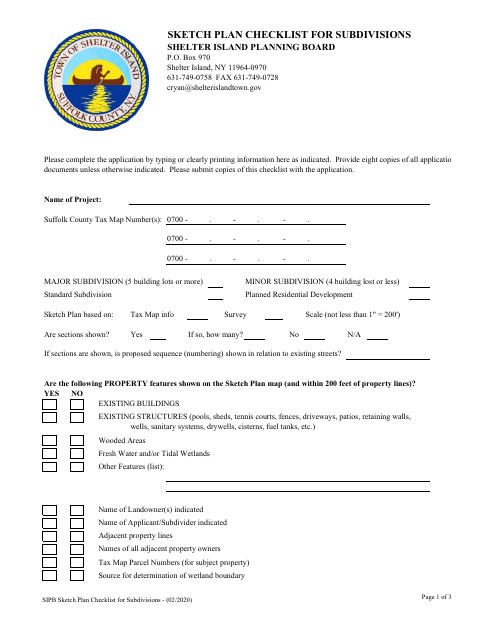
This application and checklist help landowners or applicants provide project, property, and proposed-lot information to the Shelter Island Planning Board for subdivision sketch plan review.
- licensed online notary
- ~15 min average
- Notarized PDF emailed
What you’ll need
- Government-issued photo ID
- Webcam-enabled device (laptop or phone)
- This form, ready to upload as a PDF
What this form is
Use this packet to request sketch plan review for a major or minor subdivision, including a standard subdivision or planned residential development. It asks for property, ownership, zoning, access, and proposed-lot details, and includes a checklist of map features and supporting materials. The packet also contains an Owner’s Endorsement and a Certification/Permission to Inspect the Property, which the form directs applicants or owners to sign before a notary.
Who needs it
Landowners or applicants seeking Shelter Island Planning Board sketch plan review for a major or minor subdivision should complete this application and its accompanying checklist.
Why it needs a notary
The Owner’s Endorsement and Certification each include a sworn-to-before-me jurat; the applicant or owner signing each applicable section must appear before the notary.
How to get this notarized
- 1
Download The Application
Download the subdivision sketch plan application and checklist from the Shelter Island Town website.
- 2
Complete The Forms
Fill in the project and property details, complete the checklist, and prepare the requested supporting materials.
- 3
Book An Online Notary
Book a session with a commissioned online notary for the applicable sworn sections.
- 4
Sign On Video
Appear by video, take the required oath, and sign the Owner’s Endorsement or Certification when instructed.
- 5
Submit To The Planning Board
Submit the completed application, checklist, and required copies to the Shelter Island Planning Board.
Preview the form
The blank PDF straight from Shelter Island. Look it over, then upload your filled copy to start the notary session.

You’ll need ID and a webcam.
A licensed online notary will join you on video, verify your government-issued ID, witness your signature, and apply their seal. You’ll receive the notarized PDF by email when the session ends.
Frequently asked questions
- How do I get the Owner’s Endorsement notarized?
- Complete the form fields, but wait to sign the Owner’s Endorsement until your notary session. The signer appears before the notary, takes the required oath, and signs the section.
- Do I need to notarize the Certification too?
- The Certification includes its own sworn-to-before-me jurat. If you are signing that section, plan to appear before a notary and sign it as directed.
- Can I sign this form with an online notary?
- New York authorizes remote online notarization by a commissioned online notary under Executive Law §135-c. Book a video session and sign the applicable sworn sections in the notary’s presence.
- What should I submit with the application?
- The packet calls for a completed checklist and eight copies of documents unless otherwise indicated. It also lists application materials such as the certification form, owner’s endorsement if applicable, and an electronic PDF copy.
- Who can I ask if I am unsure about submission requirements?
- Review the checklist and contact the Shelter Island Planning Board with questions; confirm with the city, town or village if unsure.
Other forms in Shelter Island
Building Permit Application
Shelter Island
Lot Line Modification Application
Shelter Island
Pool Permit Application and Fence Declaration
Shelter Island
Limited Commercial Vacation Rental License Application
Shelter Island
Wetlands Permit Application
Shelter Island
Zoning Board of Appeals Application Package
Shelter Island