
Raleigh, NC · Wake County
Appeal of Administrative Decision Application
This application lets a person or entity with standing ask the Raleigh Board of Adjustment to review a final, written City administrative decision, with supporting information and a notarized appellant signature.
- licensed online notary
- ~15 min average
- Notarized PDF emailed
What you’ll need
- Government-issued photo ID
- Webcam-enabled device (laptop or phone)
- This form, ready to upload as a PDF
What this form is
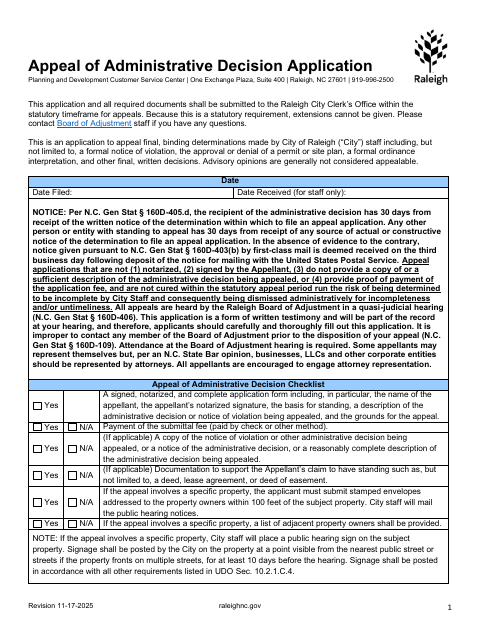
Use this application to appeal a final, binding written determination by City staff, such as a notice of violation or a permit or site-plan decision. The City requires the application, supporting documents, and fee to be filed with the City Clerk’s Office within the applicable appeal timeframe; the form warns that extensions cannot be given. It also requests the basis for standing, the decision being challenged, and specific reasons for the appeal.
Who needs it
A person or entity claiming standing to challenge a final City administrative decision must complete this application and provide the required supporting documents and fee.
Why it needs a notary
The form includes a personal-appearance acknowledgment: the appellant signs before the notary, who completes the acknowledgment, dates and signs it, prints their name, and adds commission expiration and seal.
How to get this notarized
- 1
Download the Application
Get the Appeal of Administrative Decision Application and review its checklist and filing instructions.
- 2
Complete the Form
Provide appellant details, the decision being challenged, your grounds and standing, and any applicable property or agent information.
- 3
Gather Supporting Materials
Prepare the applicable decision notice, standing documentation, fee, and property-related materials listed in the form.
- 4
Book an Online Notary
Check with the City Clerk’s Office about whether it accepts online notarization, then book a commissioned online notary if appropriate.
- 5
Sign Before the Notary
Follow the notary’s instructions to complete the form’s personal-appearance acknowledgment.
- 6
Submit to the City
File the completed application and required materials with the Raleigh City Clerk’s Office within the applicable appeal timeframe.
Preview the form
The blank PDF straight from Raleigh. Look it over, then upload your filled copy to start the notary session.

You’ll need ID and a webcam.
A licensed online notary will join you on video, verify your government-issued ID, witness your signature, and apply their seal. You’ll receive the notarized PDF by email when the session ends.
Frequently asked questions
- How do I complete this administrative appeal application?
- Describe the decision and appeal grounds, state your basis for standing, sign before a notary, and submit the application, required documents, and fee to the Raleigh City Clerk’s Office within the applicable timeframe.
- Do I need to have my signature notarized?
- Yes. The form checklist calls for a signed, notarized, complete application and identifies the appellant’s notarized signature as a required item.
- Can I use a commissioned online notary?
- North Carolina’s enacted remote electronic notarization program has not launched. Ask the City Clerk’s Office whether it accepts an acknowledgment completed with a commissioned online notary; confirm with the city or town if unsure.
- What supporting materials may I need?
- The checklist may require a copy or description of the decision, proof of standing, a submission fee, and—if the appeal involves a specific property—a list of adjacent owners and stamped envelopes addressed to owners within 100 feet.