
Columbus, OH · Franklin County
Affidavit Working Without a Permit
This one-page affidavit is for the person acknowledging work performed without a required permit at a property in Columbus and submitting the form to Building and Zoning Services.
- licensed online notary
- ~15 min average
- Notarized PDF emailed
What you’ll need
- Government-issued photo ID
- Webcam-enabled device (laptop or phone)
- This form, ready to upload as a PDF
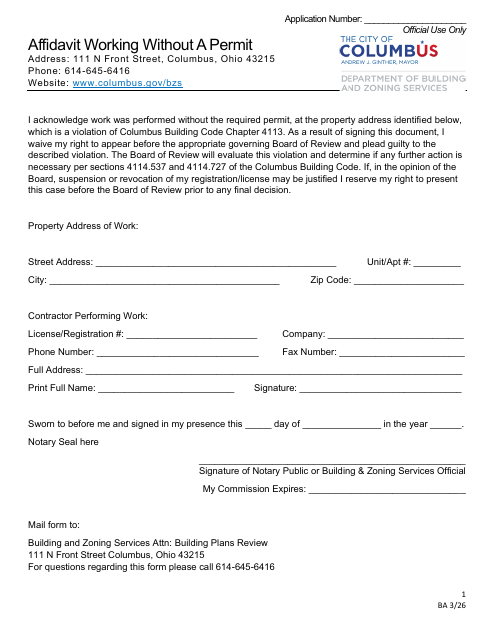
What this form is
Use this affidavit when work was performed at a property without the required permit. The signer acknowledges the violation, waives the right to appear before the appropriate Board of Review and plead guilty to the described violation. Building and Zoning Services uses the form to review the matter; the Board determines whether further action is necessary under the Columbus Building Code sections named on the form.
Who needs it
The person acknowledging unpermitted work should complete this affidavit for submission to Columbus Building and Zoning Services.
Why it needs a notary
The form has a sworn-to-before-me jurat; the person acknowledging the unpermitted work signs in the presence of a notary public or Building and Zoning Services official.
How to get this notarized
- 1
Download the Affidavit
Get the Affidavit Working Without a Permit from Columbus Building and Zoning Services.
- 2
Fill In the Form
Provide the property address, contractor details, and your printed name. Leave the signature for the notary appointment.
- 3
Book an Online Notary
Schedule a session with a commissioned online notary and have the affidavit ready.
- 4
Sign on Video
Show identification and sign when directed during the online notary session.
- 5
Submit to the City
Mail the completed affidavit to Building and Zoning Services, Attn: Building Plans Review, at the address on the form.
Preview the form
The blank PDF straight from Columbus. Look it over, then upload your filled copy to start the notary session.

You’ll need ID and a webcam.
A licensed online notary will join you on video, verify your government-issued ID, witness your signature, and apply their seal. You’ll receive the notarized PDF by email when the session ends.
Frequently asked questions
- How do I complete this affidavit?
- Enter the property and contractor details, print your name, then sign the affidavit in front of a notary public or Building and Zoning Services official.
- Do I need to sign this affidavit before a notary?
- Yes. The form says it must be sworn to and signed in the notary’s presence, or in the presence of a Building and Zoning Services official.
- Can I sign the affidavit with a commissioned online notary?
- Ohio authorizes online notarization by its notaries under R.C. §§147.60–147.66. A commissioned online notary can witness your signature by video; confirm with the city or village if unsure.
- Where do I send the completed form?
- The form directs you to mail it to Building and Zoning Services, Attn: Building Plans Review, at 111 N Front Street, Columbus, Ohio 43215.