
Oakmont, PA · Allegheny County
Certificate of Ownership & Use (Proposed Owner)
Proposed owners use this Oakmont form to provide property ownership and intended-use details to the Borough.
What this form is
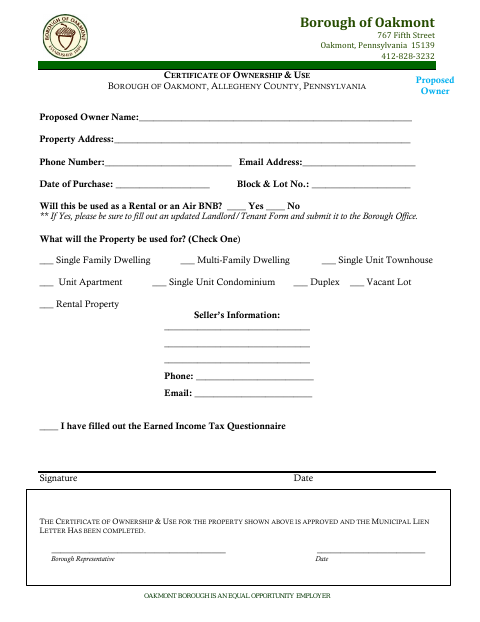
This certificate records a proposed owner’s contact information, property address, purchase date, block and lot number, and planned property use. It also asks for seller information and whether the property will be used as a rental or Airbnb; owners answering yes are told to complete and submit an updated Landlord/Tenant Form. A Borough representative section records approval and completion of the Municipal Lien Letter.
Who needs it
A proposed owner completing the Borough’s Certificate of Ownership & Use for a property in Oakmont needs this form.
How to submit it
Submit it to the city department named on the form; check the city website for current contact details. For rental or Airbnb use, submit an updated Landlord/Tenant Form to Borough Office.
About notarization
This certificate is signed and dated without a notary; rental or Airbnb use also calls for an updated Landlord/Tenant Form submitted to Borough Office.
How to submit this form
- 1
Download the Form
Download the Certificate of Ownership & Use for a proposed owner.
- 2
Complete the Owner and Property Details
Enter the requested owner, property, purchase, contact, seller, and intended-use information.
- 3
Check Rental or Airbnb Use
If the property will be a rental or Airbnb, complete an updated Landlord/Tenant Form.
- 4
Submit to the Borough
Submit the certificate to the city department named on the form; submit the updated Landlord/Tenant Form to Borough Office if applicable.
Frequently asked questions
- What information does the proposed owner provide?
- The form asks for the proposed owner’s name and contact details, property address, purchase date, block and lot number, intended use, and seller information.
- Do I need a notary for the Certificate of Ownership & Use?
- No. The certificate has a signature and date line but no notary block. If the property will be a rental or Airbnb, the form says to complete and submit an updated Landlord/Tenant Form.
- How do I submit the Certificate of Ownership & Use?
- Submit it to the city department named on the form and check Oakmont’s website for current contact details. For rental or Airbnb use, submit an updated Landlord/Tenant Form to Borough Office.
Need something notarized?
This Certificate of Ownership & Use (Proposed Owner) doesn’t need a notary — but if you have another Oakmont form that does, a commissioned online notary can help.