
Hardeeville, SC · Jasper County
Homeowner Disclosure Statement
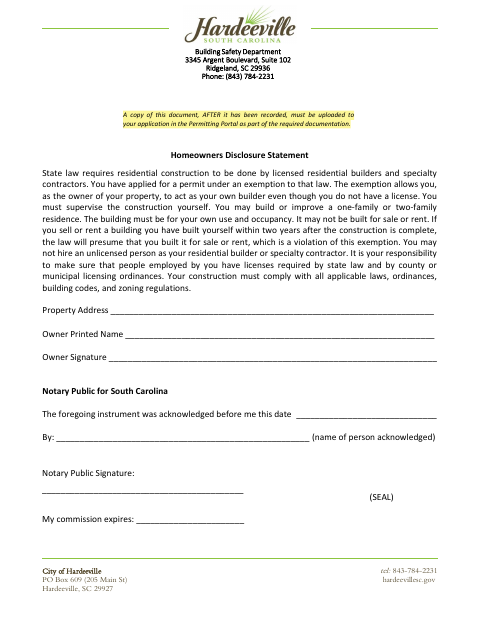
This statement explains the conditions for a property owner to act as their own builder under an exemption and is filed by the owner with a residential building permit application.
- licensed online notary
- ~15 min average
- Notarized PDF emailed
What you’ll need
- Government-issued photo ID
- Webcam-enabled device (laptop or phone)
- This form, ready to upload as a PDF
What this form is
The statement explains that an owner applying for a permit under the builder exemption must supervise construction, build for their own use and occupancy, and follow applicable laws, codes, and regulations. Hardeeville’s form says a copy must be recorded and then uploaded to the Permitting Portal as required documentation for the application.
Who needs it
A property owner applying for a permit under the builder exemption needs this statement to document their responsibilities for the residential construction.
Why it needs a notary
The form carries an acknowledgment block, and the property owner named on the statement signs before a notary, who completes the date, name, signature, and commission-expiration fields.
How to get this notarized
- 1
Download The Form
Get the Homeowner Disclosure Statement from the City of Hardeeville.
- 2
Fill In The Statement
Enter the property address and owner information, then review the exemption responsibilities.
- 3
Book An Online Notary
Arrange an appointment with a commissioned online notary for the owner’s acknowledgment.
- 4
Sign On Video
Sign during the online notarization session and have the notary complete the acknowledgment.
- 5
Record And Submit
Have the document recorded, then upload a copy to your Permitting Portal application as directed by the form.
Preview the form
The blank PDF straight from Hardeeville. Look it over, then upload your filled copy to start the notary session.

You’ll need ID and a webcam.
A licensed online notary will join you on video, verify your government-issued ID, witness your signature, and apply their seal. You’ll receive the notarized PDF by email when the session ends.
Frequently asked questions
- How do I submit the completed Homeowner Disclosure Statement?
- After the document is completed and acknowledged before a notary, have it recorded. The form directs you to upload a copy after recording to your application in the Permitting Portal.
- Do I need to sign this statement before a notary?
- Yes. The form includes an acknowledgment before a notary public. The property owner named on the statement signs, and the notary completes the acknowledgment fields.
- Can I use a remote online notary for this form?
- South Carolina has not authorized remote online notarization for its own notaries. A commissioned online notary may perform the act under the law of the jurisdiction where it is made; South Carolina recognizes qualifying out-of-state notarial acts under §§26-1-120(G) and 26-3-20.
- What does the builder exemption require of the property owner?
- The statement says the owner must supervise construction, build or improve a one- or two-family residence for their own use and occupancy, and ensure the work complies with applicable laws, codes, and regulations. Confirm with the city or town if unsure.
Homeowner Disclosure Statement in other South Carolina cities
Each city publishes its own version of this form. Pick the city where you’re filing.