
Diboll, TX · Angelina County
Commercial Alarm Permit Application
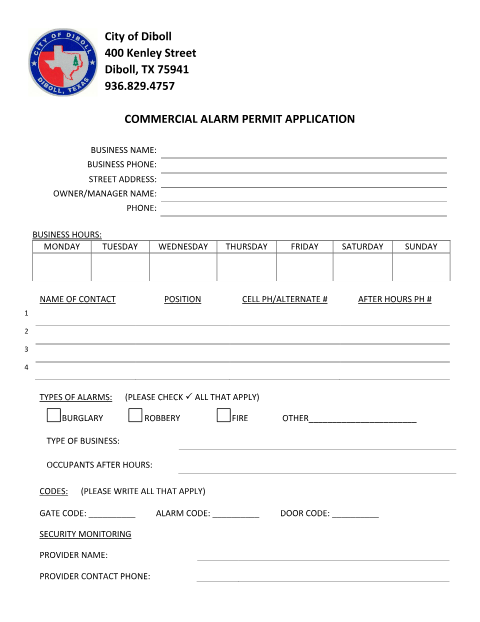
A commercial business owner or manager uses this application to provide Diboll with business, contact, alarm, access-code, and hazard information.
What this form is
The application collects information about a commercial business, including its address, owner or manager, business hours, contacts, alarm types, and security monitoring provider. It also asks for after-hours occupant details, gate, alarm, and door codes, and any hazards at the location. The document does not state when the city requires the application or provide submission instructions.
Who needs it
A commercial business owner or manager who needs to provide Diboll with business and alarm information can complete this application.
How to submit it
Submit it to the city department named on the form; check the city website for current contact details.
About notarization
No notary is required; the application has no notary block or notarized attachment, and the signer just signs and dates it.
How to submit this form
- 1
Download The Application
Download the Commercial Alarm Permit Application PDF.
- 2
Complete The Business Details
Fill in the business address, owner or manager, contact information, and business hours.
- 3
Add Alarm And Location Details
Check the alarm types that apply and provide the requested codes, monitoring provider, after-hours occupants, and hazards.
- 4
Submit To The City
Submit it to the city department named on the form; check the city website for current contact details.
Frequently asked questions
- What information does the Commercial Alarm Permit Application request?
- It asks for business and contact details, business hours, alarm types, access codes, the monitoring provider, after-hours occupants, and hazards at the location.
- Who uses this application?
- A commercial business owner or manager can use it to provide Diboll with business, contact, alarm, and location details.
- Do I need a notary for the Commercial Alarm Permit Application?
- No. The application has no notary block or notarized attachment; the signer just signs and dates it.
- How do I submit the Commercial Alarm Permit Application?
- Submit it to the city department named on the form; check the city website for current contact details.