
Ellis County, TX · Ellis County
Request For Issuance – E-Filing Or Pro Se Citations, Precepts, Notices, Writs, TROs
This form requests issuance of specified court documents and is completed by a person filing electronically or representing themselves in a case.
At a glance
- Issued by
- City of Ellis County · Ellis County, Ellis County, Texas
- Notarization
- Not required: file this form without a notary.
- Official source
- elliscountytx.gov
- Blank form
- Download the PDF
- Catalogued
- Machine-readable
- JSON record · about the forms index
What this form is
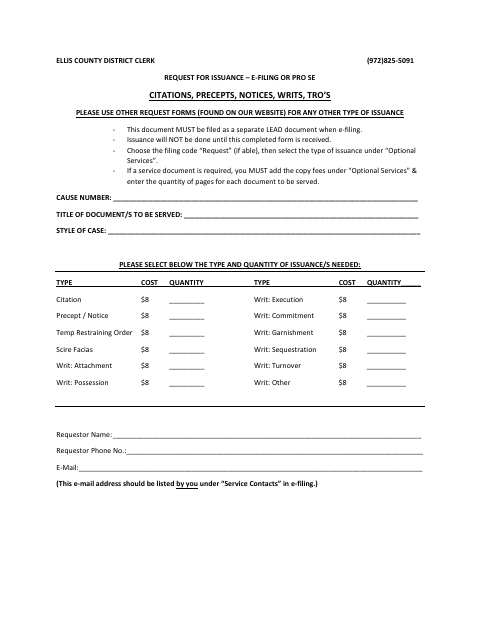
Use this form to request citations, precepts or notices, writs, temporary restraining orders, or other listed issuance in a case. The Ellis County District Clerk says issuance will not occur until the completed form is received and asks for the cause number, case style, requested issuance and quantity, requestor contact details, and service information. Posting or publication requires a motion and order.
Who needs it
A case requestor seeking one of the listed issuances from the Ellis County District Clerk should complete and file this form.
How to submit it
File the completed form as a separate lead document through e-filing; choose filing code “Request” if available, then select the issuance under “Optional Services.”
About notarization
This request does not require notarization; it gives no instructions for a sworn attachment and does not specify a signature or date step.
How to submit this form
- 1
Download The Form
Download the Ellis County District Clerk issuance request PDF.
- 2
Complete The Request
Enter the case and requestor information, select the issuance and quantity, and provide service details for each party.
- 3
Gather Required Items
For posting or publication, include the required motion and order. Add service-copy fees and page quantities under “Optional Services” when required.
- 4
File With The District Clerk
Submit as a separate lead document through e-filing, using filing code “Request” if available and selecting the issuance under “Optional Services.”
Frequently asked questions
- What can I request with this form?
- The form lists citations, precepts or notices, temporary restraining orders, scire facias, and several types of writs, including execution, garnishment, and possession.
- How do I submit the issuance request?
- File it as a separate lead document through e-filing. Choose the “Request” filing code if available, then select the issuance under “Optional Services.”
- Do I need a notary for this issuance request?
- No. This request does not require notarization; it gives no instructions for a sworn attachment and does not specify a signature or date step.
- What if I request posting or publication?
- The form says a motion and order are required for posting or publication. For publication, it also asks you to identify the publication.