
Kemah, TX · Galveston County
Security Alarm Permit Application
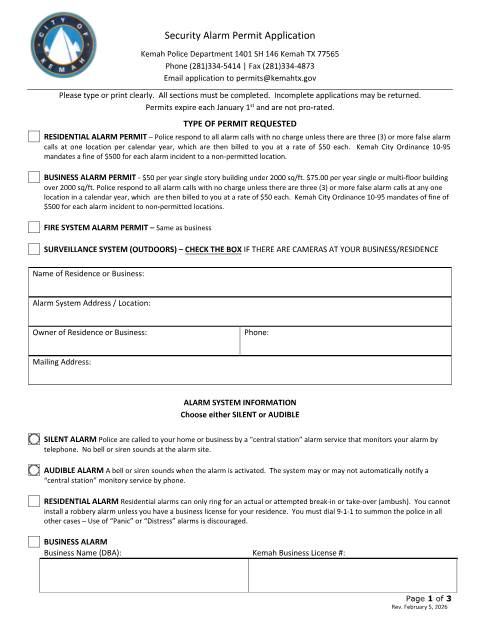
Kemah residents and businesses use this application to request a permit for a residential, business, fire system, or outdoor surveillance alarm.
What this form is
Use this application to request a Kemah permit for a residential or business alarm, fire system alarm, or outdoor surveillance system. The form says non-permitted locations may be fined for alarm incidents and permits expire each January 1; business permit fees are listed by building size. Applicants provide property, alarm, company, and responsible-party details, and may complete the attached credit card authorization.
Who needs it
Residents and businesses seeking a Kemah permit for an alarm system should complete the sections that apply to their property and system.
How to submit it
Email the application to [email protected] with a completed credit card authorization, or mail it with payment to City of Kemah – Permits, 1401 SH 146, Kemah, TX 77565. Make checks payable to The City of Kemah.
About notarization
This application is signed without a notary; the credit card authorization asks the cardholder to sign and date it.
How to submit this form
- 1
Download The Application
Download the Security Alarm Permit Application PDF.
- 2
Complete The Application
Type or print clearly and complete all applicable sections, including the alarm system and responsible-party information.
- 3
Prepare Payment
For email submission, include a completed credit card authorization; for mail, include payment and make checks payable to The City of Kemah.
- 4
Submit To Kemah
Email the application to [email protected] or mail it to City of Kemah – Permits, 1401 SH 146, Kemah, TX 77565.
Frequently asked questions
- Do I need a notary for the Security Alarm Permit Application?
- No. This application is signed without a notary; if you complete the attached credit card authorization, the cardholder signs and dates that section.
- How do I submit the Security Alarm Permit Application?
- Email it to [email protected] with a completed credit card authorization, or mail it with payment to City of Kemah – Permits, 1401 SH 146, Kemah, TX 77565.
- What information does the application request?
- It asks for property and alarm details, alarm installation and monitoring company information, and responsible-party contacts. Business applicants also provide the business name and Kemah business license number.
- When do Kemah alarm permits expire?
- The application states that permits expire each January 1 and are not prorated.