
Dripping Springs, TX · Hays County
Third-Party Review Declaration of Compliance and Liability
A sworn declaration a licensed third-party plan reviewer signs before a notary certifying that plans they reviewed comply with applicable codes, as required by state law.
- licensed online notary
- ~15 min average
- Notarized PDF emailed
What you’ll need
- Government-issued photo ID
- Webcam-enabled device (laptop or phone)
- This form, ready to upload as a PDF
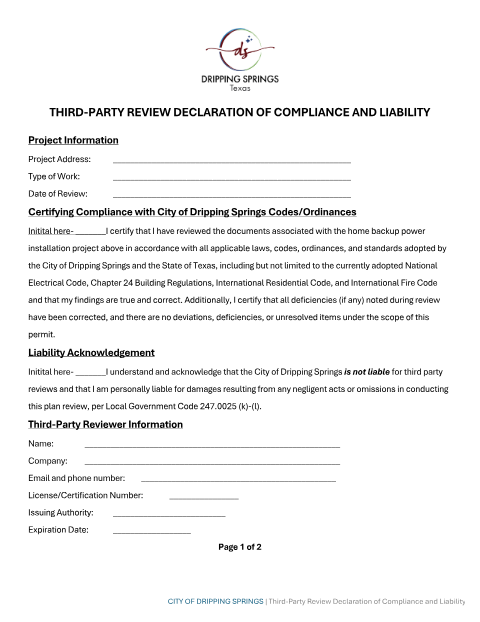
What this form is
Dripping Springs allows certain building plans to be reviewed by a licensed third-party plan reviewer instead of city staff. Texas Local Government Code §247.0025(h) requires that reviewer to sign a declaration of compliance and liability for each plan review, and the City requires that declaration to be notarized so it can rely on it as a sworn record before issuing a building permit.
Who needs it
Licensed third-party plan reviewers performing plan reviews for Dripping Springs construction projects in place of city review staff.
Why it needs a notary
The form includes a 'Notary Information' block requiring the declaration to be 'Subscribed and sworn before me by affiant,' as required by Local Government Code §247.0025(h).
How to get this notarized
- 1
Download the Form
Get the Third-Party Review Declaration from the City of Dripping Springs Forms page.
- 2
Complete the Review Details
Fill in the project, plan set, and reviewer license information.
- 3
Book an Online Notary Session
Schedule a video appointment with a commissioned online notary.
- 4
Verify Your Identity
Present a valid photo ID to the notary during the video call.
- 5
Sign on Video
Sign and swear the declaration while the notary watches live and completes the notarization.
- 6
Submit to the City
Deliver the notarized declaration to Dripping Springs Building Department with the plan submittal.
Preview the form
The blank PDF straight from Dripping Springs. Look it over, then upload your filled copy to start the notary session.

You’ll need ID and a webcam.
A licensed online notary will join you on video, verify your government-issued ID, witness your signature, and apply their seal. You’ll receive the notarized PDF by email when the session ends.
Frequently asked questions
- How do I notarize a Dripping Springs third-party review declaration?
- Complete the declaration, then book an online notarization session where a commissioned online notary verifies your ID and witnesses your signature over live video.
- Do I need a notary for this declaration?
- Yes. Texas Local Government Code §247.0025(h) requires the declaration to be subscribed and sworn before a notary.
- Can a commissioned online notary handle this required Texas declaration?
- Texas has authorized remote online notarization since 2018, and out-of-state notary acknowledgments are recognized as well. Check with the City of Dripping Springs Building Department if you are unsure.
- Who signs this declaration?
- The licensed third-party plan reviewer who reviewed the plans signs as the affiant before the notary.
- What do I need for my video notarization appointment?
- A valid government-issued photo ID and the completed, unsigned declaration — you will sign it live on camera in front of the online notary.