
Hidalgo County, TX · Hidalgo County
Employment Verification Form
This WIC employment verification form is completed by an employee and their employer to document earnings for a household applying for assistance.
At a glance
- Issued by
- City of Hidalgo County · Hidalgo County, Hidalgo County, Texas
- Notarization
- Not required: file this form without a notary.
- Official source
- hidalgocounty.us
- Blank form
- Download the PDF
- Catalogued
- Machine-readable
- JSON record · about the forms index
What this form is
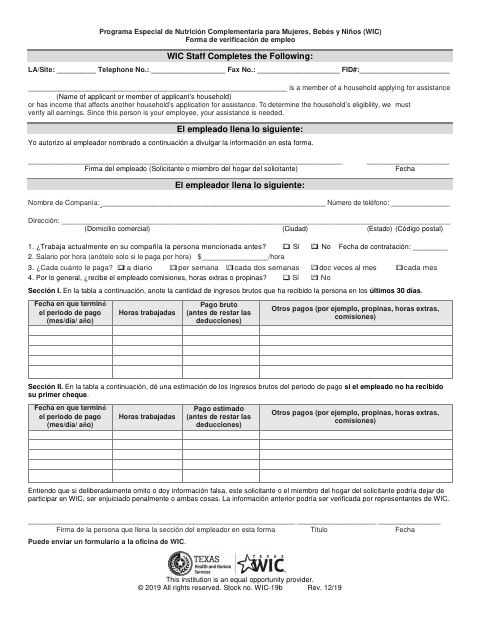
This form helps WIC verify earnings when an employee is part of a household applying for assistance or has income that affects another household member’s application. The employee authorizes disclosure, and the employer reports employment status, pay frequency, wages, hours, and other payments. The form also includes a section for estimating earnings if the employee has not received a first paycheck.
Who needs it
An employee applying for WIC assistance, or whose income affects a household member’s application, and that employee’s employer complete the form.
How to submit it
Send the completed form to a WIC office, as the document directs. It does not provide an office address, email, portal, or fee.
About notarization
No notary is required; the employee signs and dates the authorization, and the employer signs, provides a title, and dates the verification.
How to submit this form
- 1
Download the Form
Download the Employment Verification Form to provide earnings information for a WIC assistance application.
- 2
Complete the Authorization
The employee authorizes disclosure and signs and dates the employee section.
- 3
Have the Employer Complete It
The employer enters company, employment, pay, and earnings information, then signs, provides a title, and dates the form.
- 4
Send It to WIC
Send the completed form to a WIC office, as directed on the document.
Frequently asked questions
- What is the WIC Employment Verification Form for?
- It lets an employer provide employment and earnings details so WIC can verify income for a household applying for assistance.
- Who completes the Employment Verification Form?
- The employee completes and signs the authorization section. The employer fills in company and wage information, then signs, provides a title, and dates the form.
- Do I need a notary for the Employment Verification Form?
- No. The form is signed without a notary; the employee signs and dates the authorization, and the employer signs and dates the verification.
- How do I submit the Employment Verification Form?
- Send the completed form to a WIC office, as the document directs. It does not list an office address, email, online portal, or fee.