
Hidalgo County, TX · Hidalgo County
Self-Employment or Farmer Applicant Statement
This WIC income statement is for applicants who work for themselves or farm to report business receipts, operating expenses, and net income.
At a glance
- Issued by
- City of Hidalgo County · Hidalgo County, Hidalgo County, Texas
- Notarization
- Not required: file this form without a notary.
- Official source
- hidalgocounty.us
- Blank form
- Download the PDF
- Catalogued
- Machine-readable
- JSON record · about the forms index
What this form is
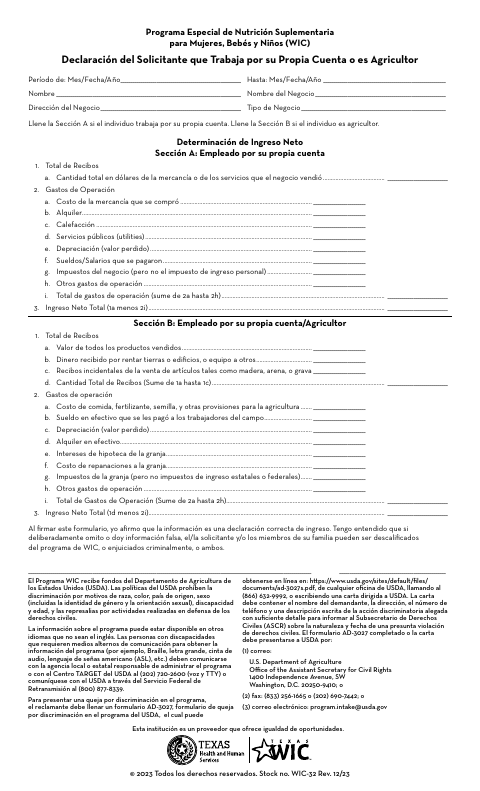
This WIC statement documents income for an applicant who is self-employed or a farmer. Complete Section A for self-employment or Section B for farming, and report the applicable receipts, operating expenses, and total net income for the stated period. The applicant signs to affirm that the income information is correct and acknowledges the consequences of deliberately omitting or providing false information.
Who needs it
WIC applicants who work for themselves or farm use this statement to report income and related business or farm expenses.
How to submit it
Submit it to the county department named on the form; check the county website for current contact details.
About notarization
This document is signed without a notary; it includes no notarized or sworn attachment, and the signer just signs and dates it.
How to submit this form
- 1
Download the Statement
Download the WIC self-employment or farmer income statement.
- 2
Complete the Applicable Section
Enter the period, applicant and business details, then complete Section A for self-employment or Section B for farming.
- 3
Review and Sign
Check the income information and sign to affirm that it is correct.
- 4
Submit to the County
Submit the statement to the county department named on the form; check the county website for current contact details.
Frequently asked questions
- Do I need a notary for the Self-Employment or Farmer Applicant Statement?
- No. This statement is signed without a notary, and the document identifies no notarized or sworn attachment.
- How do I submit the WIC income statement?
- The form does not provide submission instructions. Submit it to the county department named on the form and check the county website for current contact details.
- Which section should I complete?
- Complete Section A if you work for yourself. Complete Section B if you are a farmer, and report the receipts, operating expenses, and net income requested there.