
Celeste, TX · Hunt County
Contractor Registration Form
Contractors and subcontractors use this form to register with the City of Celeste and provide business, license, and contact information.
What this form is
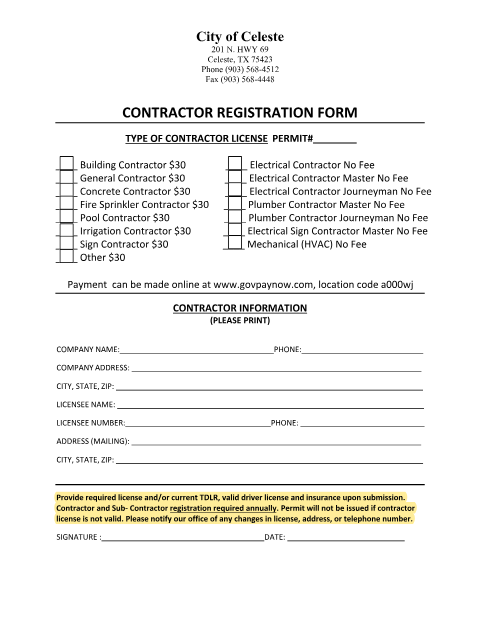
This form registers contractors and subcontractors with the City of Celeste; registration is required annually. It asks for contractor type, company and licensee details, contact information, and a signature and date. The form says to provide the required license and/or current TDLR, a valid driver license, and insurance upon submission, and notes that a permit will not be issued if the contractor license is not valid.
Who needs it
Contractors and subcontractors registering with the City of Celeste annually need this form and the listed license and insurance documents.
How to submit it
Submit it to the city department named on the form; check the city website for current contact details.
About notarization
This form is signed and dated without a notary; the signer just signs and dates it.
How to submit this form
- 1
Download The Form
Download the Contractor Registration Form PDF.
- 2
Complete The Form
Print your company, contractor, licensee, contact, and contractor-type information, then sign and date the form.
- 3
Gather Required Documents
Gather the required license and/or current TDLR, a valid driver license, and insurance for submission.
- 4
Submit To The City
Submit it to the city department named on the form; check the city website for current contact details.
Frequently asked questions
- Who uses the Contractor Registration Form?
- Contractors and subcontractors use it to register with the City of Celeste. The form states that registration is required annually.
- What information and documents does the form request?
- It asks for contractor type, company and licensee details, and contact information. It says to provide the required license and/or current TDLR, a valid driver license, and insurance upon submission.
- How do I submit the Contractor Registration Form?
- Submit it to the city department named on the form; check the city website for current contact details.
- Do I need a notary for the Contractor Registration Form?
- No. The form is signed and dated without a notary; the signer just signs and dates it.