
Port Arthur, TX · Jefferson County
Plat Application
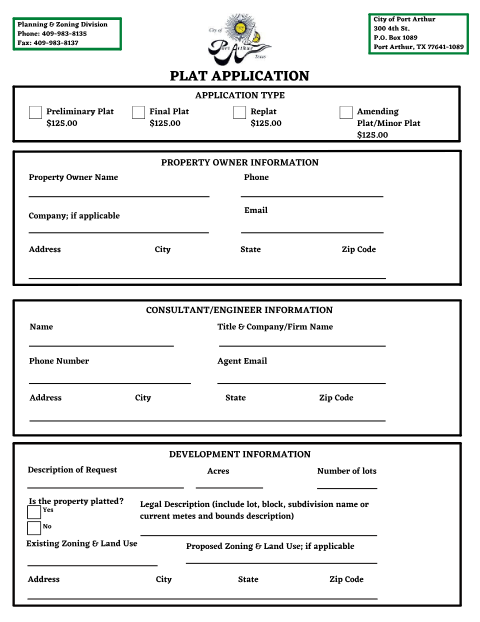
A notarized application property owners and developers file with Port Arthur's Planning & Zoning Division for a preliminary, final, replat, or minor/amending plat.
- licensed online notary
- ~15 min average
- Notarized PDF emailed
What you’ll need
- Government-issued photo ID
- Webcam-enabled device (laptop or phone)
- This form, ready to upload as a PDF
What this form is
Anyone platting, replatting, or amending a plat within Port Arthur submits this application to the Planning & Zoning Division along with a $125 fee. Under House Bill 3167, the City must review the application within 30 days of receipt. Texas law and city practice require the owner's and agent's signatures to be notarized before the application is accepted, with a separate $125 notary-statement fee noted on the form.
Who needs it
Property owners, developers, or their authorized agents seeking a preliminary plat, final plat, replat, or amending/minor plat in Port Arthur.
Why it needs a notary
The form states in bold that ALL SIGNATURES MUST BE NOTARIZED, with a jurat reading 'Before me, the undersigned authority, on this day personally appeared...' and a $125 notary-statement fee per Ordinance 90-49.
How to get this notarized
- 1
Download the Form
Get the Plat Application from Port Arthur's Permits & Applications page.
- 2
Fill In Owner and Development Details
Enter the property owner, consultant/engineer, and description of the requested plat action.
- 3
Book an Online Notary Session
Schedule a video session with a commissioned online notary at Rush Notary.
- 4
Sign on Video
Appear on camera, verify your identity, and sign the notary statement before the notary.
- 5
Submit to Planning & Zoning
Deliver the notarized application and $125 fee to Port Arthur's Planning & Zoning Division.
Preview the form
The blank PDF straight from Port Arthur. Look it over, then upload your filled copy to start the notary session.

You’ll need ID and a webcam.
A licensed online notary will join you on video, verify your government-issued ID, witness your signature, and apply their seal. You’ll receive the notarized PDF by email when the session ends.
Frequently asked questions
- How do I get the Port Arthur Plat Application notarized online?
- Complete the property owner, consultant/engineer, and development information sections, then book a video session with a commissioned online notary to sign the notary statement.
- Do I need to notarize the Plat Application?
- Yes. The form states in bold that all signatures must be notarized, and the City charges a separate $125 notary-statement fee under Ordinance 90-49.
- Who signs the Plat Application?
- The property owner and, if applicable, the authorized agent representing the owner both sign before a notary.
- Can an online notary handle a Port Arthur plat application?
- Yes, Texas recognizes acknowledgments taken by commissioned online notaries; check with the Planning & Zoning Division if you are unsure whether they will accept it.