
Cleburne, TX · Johnson County
Release from Extraterritorial Jurisdiction Petition
This petition lets a property owner or authorized agent ask Cleburne to release identified property from the city’s extraterritorial jurisdiction and submit required ownership and property details.
- licensed online notary
- ~15 min average
- Notarized PDF emailed
What you’ll need
- Government-issued photo ID
- Webcam-enabled device (laptop or phone)
- This form, ready to upload as a PDF
What this form is
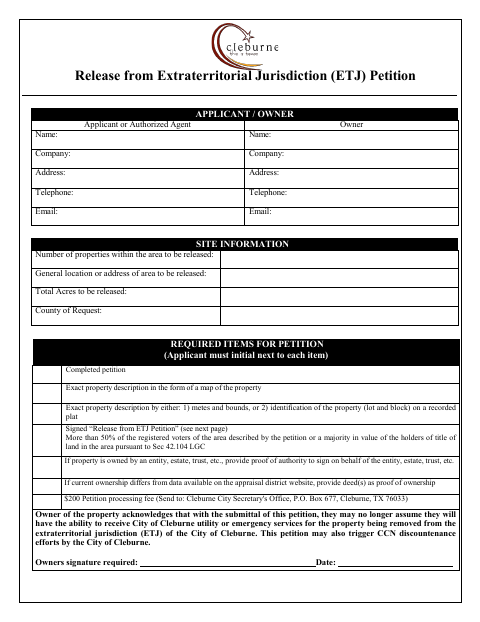
Use this petition to ask for identified property to be removed from Cleburne’s extraterritorial jurisdiction (ETJ). The applicant must provide site and ownership information, an exact property description, and the required voter or land-title support, along with any applicable proof of signing authority or ownership. The form also describes possible effects on city utility or emergency services and potential CCN discountenance efforts.
Who needs it
A property owner or authorized agent seeking release of identified property from Cleburne’s ETJ must complete and submit this petition with its required items.
Why it needs a notary
The form has acknowledged-before-me blocks for property owners or authorized agents, who sign the petition before a notary and provide the notary’s signature.
How to get this notarized
- 1
Download The Petition
Get the Release from Extraterritorial Jurisdiction Petition from the City of Cleburne.
- 2
Fill In The Petition
Complete the applicant, owner, and site information, and gather the required property descriptions and supporting items.
- 3
Book An Online Notary
Schedule a remote notarization for the property owner or authorized agent who will sign.
- 4
Sign On Video
Sign the petition during the online notary session and complete the acknowledgment block.
- 5
Submit To The City
Send the completed petition, required items, and processing fee to the Cleburne City Secretary’s Office.
Preview the form
The blank PDF straight from Cleburne. Look it over, then upload your filled copy to start the notary session.

You’ll need ID and a webcam.
A licensed online notary will join you on video, verify your government-issued ID, witness your signature, and apply their seal. You’ll receive the notarized PDF by email when the session ends.
Frequently asked questions
- How do I complete the ETJ release petition?
- Provide the applicant, owner, and site information, attach the required property description and supporting items, then sign the petition before a notary. Submit it with the processing fee to the Cleburne City Secretary’s Office.
- Do I need to sign the petition before a notary?
- Yes. The petition includes acknowledged-before-me blocks for the property owner or authorized agent, with spaces for the notary’s signature and seal.
- Can I use an online notary for this petition?
- Texas has authorized remote online notarization since 2018 under Government Code Chapter 406, Subchapter C. You can sign during a video session with a commissioned online notary; confirm with the city if unsure.
- What supporting items does the petition list?
- The checklist calls for an exact property description by map and metes and bounds or recorded plat identification, voter or land-title support, and, when applicable, proof of signing authority or deeds showing ownership.