
Llano County, TX · Llano County
Request for Issuance and Service
This request form lets a party ask the Llano County District Clerk to issue and arrange service of listed court documents through eFiling.
At a glance
- Issued by
- City of Llano County · Llano County, Llano County, Texas
- Notarization
- Not required: file this form without a notary.
- Official source
- llanocounty.gov
- Blank form
- Download the PDF
- Catalogued
- Machine-readable
- JSON record · about the forms index
What this form is
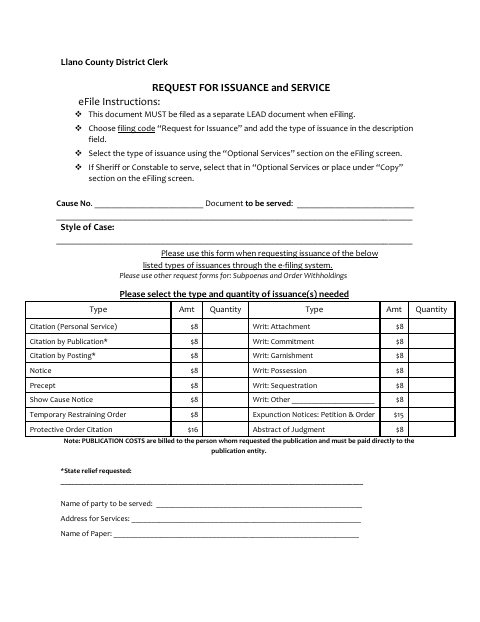
Use this form to request issuance and service of listed documents, including citations, notices, writs, and other types shown on the form. The form says to file it as a separate lead document through eFiling and not to use it for subpoenas or order withholdings. It asks for case and service details, the requested issuance, service method, contact information, and the requester’s signature.
Who needs it
A party requesting issuance and service of a listed court document through the Llano County District Clerk’s eFiling process needs this form.
How to submit it
File this as a separate lead document through eFiling using filing code “Request for Issuance” and add the issuance type in the description field. Select the issuance and service options on the eFiling screen.
About notarization
This document is signed without a notary; it contains no sworn or notarized attachment or related step, so the signer just signs and dates it.
How to submit this form
- 1
Download the Form
Download the Request for Issuance and Service PDF.
- 2
Complete the Request
Provide the case, issuance, service, and requester information, then sign the form.
- 3
Choose Efiling Options
Use the filing code “Request for Issuance,” describe the issuance type, and select issuance and service options.
- 4
File With the Clerk
File the form as a separate lead document through eFiling.
Frequently asked questions
- Do I need a notary for the Request for Issuance and Service?
- No. This document is signed without a notary, and it does not identify any sworn or notarized attachment or related step.
- How do I submit the Request for Issuance and Service?
- File it as a separate lead document through eFiling. Use filing code “Request for Issuance,” describe the issuance type, and select the issuance and service options on the eFiling screen.
- What information does the request ask for?
- It asks for the cause number, document to be served, case style, requested issuance and quantity, service details, requester contact information, and signature.
- Can I use this form to request a subpoena?
- No. The form directs users to use other request forms for subpoenas and order withholdings.