
Montague County, TX · Montague County
E-Filing Request for Issuance
This form lets a party request court process for service through Montague County District Clerk’s e-filing system.
At a glance
- Issued by
- City of Montague County · Montague County, Montague County, Texas
- Notarization
- Not required: file this form without a notary.
- Official source
- co.montague.tx.us
- Blank form
- Download the PDF
- Catalogued
- Machine-readable
- JSON record · about the forms index
What this form is
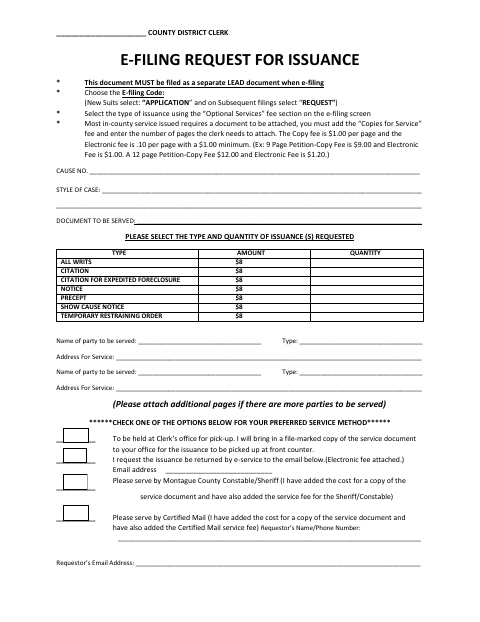
Use this request when filing electronically and asking the District Clerk to issue items such as citations, notices, or writs. It must be filed as a separate lead document. The form asks for the case number, case style, document to be served, requested issuance types and quantities, parties’ service details, preferred service method, and requestor contact information.
Who needs it
A party e-filing a request for the District Clerk to issue process for service needs to complete this form.
How to submit it
File this as a separate lead document through e-filing; select “APPLICATION” for new suits or “REQUEST” for subsequent filings. Choose the issuance type under Optional Services and add any applicable copy and service fees.
About notarization
No notary is required; the form has no notary block and describes no notarized attachment or related sworn step.
How to submit this form
- 1
Download the Form
Download the E-Filing Request for Issuance form.
- 2
Complete the Request
Enter the case and service details, requested issuance types and quantities, preferred service method, and requestor contact information.
- 3
Prepare Service Documents
For most in-county service, attach the document and add the Copies for Service fee and page count; add applicable service fees.
- 4
File Through E-Filing
File the request as a separate lead document, using the appropriate e-filing code and Optional Services selection.
Frequently asked questions
- Do I need a notary for the E-Filing Request for Issuance?
- No. The form has no notary block and does not describe a notarized attachment or related sworn step.
- How do I submit the E-Filing Request for Issuance?
- File it as a separate lead document through e-filing. Select “APPLICATION” for new suits or “REQUEST” for subsequent filings, and choose the issuance type under Optional Services.
- What information does the request ask for?
- It asks for the cause number, case style, document to be served, requested issuance and quantity, service-party details, preferred service method, and requestor contact information.
- Are there copy or electronic fees?
- The form states that copies for service cost $1.00 per page and the electronic fee is $0.10 per page, with a $1.00 minimum.