
Panola County, TX · Panola County
E-Filing Request for Issuance
This form lets filers request citations, writs, notices, subpoenas, or other listed issuance and service options from the Panola County Clerk through e-filing.
At a glance
- Issued by
- City of Panola County · Panola County, Panola County, Texas
- Notarization
- Not required: file this form without a notary.
- Official source
- co.panola.tx.us
- Blank form
- Download the PDF
- Catalogued
- Machine-readable
- JSON record · about the forms index
What this form is
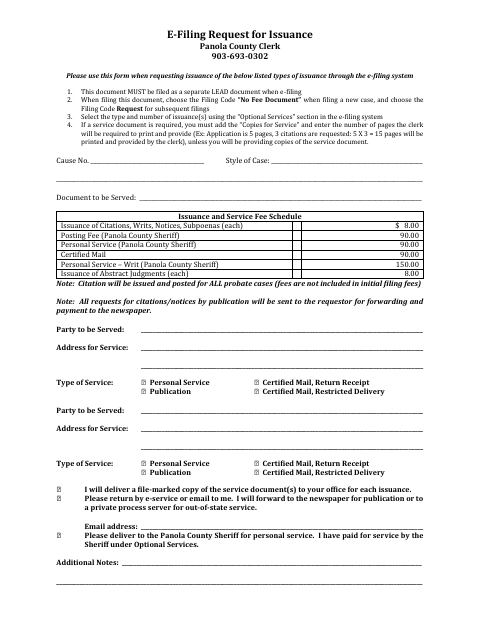
This request form tells the Panola County Clerk which issuance and service options are requested through the e-filing system. Filers provide case and service details, identify parties and addresses, select service types, and indicate how service documents should be handled; the form also explains separate lead-document filing and filing-code selections.
Who needs it
People requesting issuance through the e-filing system use this form to specify the documents, service types, and handling instructions for their case.
How to submit it
File this as a separate lead document through the e-filing system. Choose “No Fee Document” for a new case or “Request” for subsequent filings, and select issuance options under “Optional Services.”
About notarization
This document is submitted without a notary; it lists no notarized attachment or sworn step, so the signer just signs and dates it.
How to submit this form
- 1
Download the Request
Download the E-Filing Request for Issuance from the Panola County document page.
- 2
Complete the Form
Enter the case and service information, including the document to be served, party details, addresses, and requested service type.
- 3
Gather Service Documents
If copies are needed for service, add Copies for Service in the e-filing system and enter the number of pages, unless you will provide the copies.
- 4
Submit Through E-Filing
File the form as a separate lead document, select the appropriate filing code, and choose the issuance options under Optional Services.
Frequently asked questions
- What is the E-Filing Request for Issuance used for?
- It lets filers request listed documents such as citations, writs, notices, and subpoenas through the e-filing system and specify service options.
- How do I submit the issuance request?
- File the form as a separate lead document through the e-filing system. Select the filing code for a new or subsequent filing, then choose issuance options under Optional Services.
- Do I need a notary for the E-Filing Request for Issuance?
- No. This request is submitted without a notary, and the form identifies no notarized attachment or sworn step.
- What service information does the form ask for?
- It asks for case details, the document to be served, party names and addresses, service types, and instructions for handling service documents.