
Chandler, AZ · Maricopa County
Administrative Use Permit Submittal Checklist
This checklist helps applicants seeking a Chandler Administrative Use Permit identify required plans, supporting documents, and application steps before submitting online.
What this form is
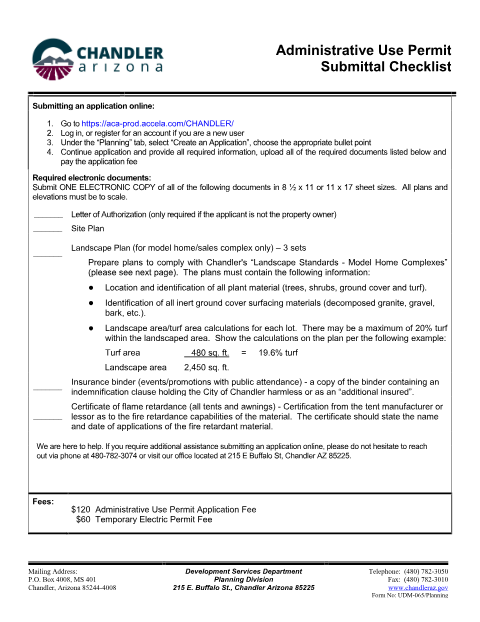
Chandler’s Planning Division checklist explains the electronic documents required for an Administrative Use Permit application and how to submit the application online. Applicants provide a site plan and, when applicable, a letter of authorization, landscape plan, insurance binder, or flame-retardance certificate. The checklist also includes model-home landscape standards and an authorization page for applicants filing on a property owner’s behalf.
Who needs it
Applicants seeking an Administrative Use Permit in Chandler use this checklist to prepare required documents, including property owners’ representatives when authorization is required.
How to submit it
Submit online through Chandler’s Accela portal by logging in or registering, selecting Planning and Create an Application, and uploading the required documents. The checklist lists a $120 application fee and a $60 temporary electric permit fee.
About notarization
This document is signed without a notary; when required, the applicant and property owner sign and date the letter of authorization.
How to submit this form
- 1
Download The Checklist
Download the Administrative Use Permit Submittal Checklist PDF.
- 2
Complete The Application
Log in or register through Chandler’s Accela portal, select Planning and Create an Application, and provide the required information.
- 3
Gather Required Documents
Prepare the documents that apply, such as a site plan, authorization letter, landscape plan, insurance binder, or flame-retardance certificate.
- 4
Submit To The City
Upload the required documents through the Accela application and pay the applicable fee listed on the checklist.
Frequently asked questions
- Do I need a notary for the Administrative Use Permit Submittal Checklist?
- No. The checklist does not require notarization; when a letter of authorization is required, the applicant and property owner sign and date it.
- How do I submit an Administrative Use Permit application?
- Use Chandler’s Accela portal: log in or register, select Planning and Create an Application, choose the appropriate option, and upload the required documents.
- What documents may be required with the application?
- The checklist lists a site plan and, depending on the application, a letter of authorization, model-home landscape plan, insurance binder, and flame-retardance certificate.
- What fees does the checklist list?
- It lists a $120 Administrative Use Permit application fee and a $60 Temporary Electric Permit fee.
Need something notarized?
This Administrative Use Permit Submittal Checklist doesn’t need a notary — but if you have another Chandler form that does, a commissioned online notary can help.