
El Mirage, AZ · Maricopa County
Certificate of Occupancy Sign-Off Sheet – Commercial
Commercial property owners or contractors use this sheet to collect department inspection approvals before the city processes a certificate of occupancy.
What this form is
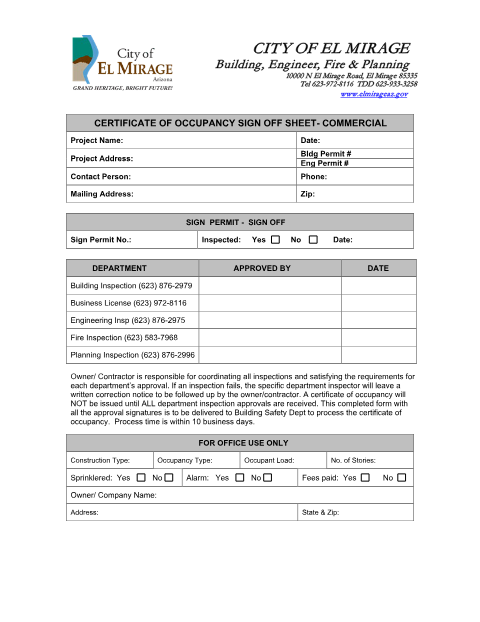
This sheet collects sign-offs from Building Inspection, Business License, Engineering Inspection, Fire Inspection, and Planning Inspection for a commercial project. The owner or contractor coordinates the inspections and satisfies each department’s requirements; the certificate of occupancy will not be issued until all approvals are received. The form requests project, permit, contact, and sign-permit details.
Who needs it
Commercial project owners or contractors who need a certificate of occupancy use this sheet to coordinate and document required city department approvals.
How to submit it
After all department approval signatures are collected, deliver the completed form to the Building Safety Department to process the certificate of occupancy. The form lists the city address as 10000 N El Mirage Road, El Mirage 85335.
About notarization
This form is completed without a notary; department approval signatures are required, and the form does not identify a sworn or notarized attachment.
How to submit this form
- 1
Download The Form
Download the Commercial Certificate of Occupancy Sign-Off Sheet.
- 2
Complete Project Details
Enter the project, address, building and engineering permit, contact, and sign-permit information requested.
- 3
Coordinate Inspections
Coordinate the listed department inspections and obtain all required approval signatures.
- 4
Deliver The Form
Deliver the completed form with all approval signatures to the Building Safety Department.
Frequently asked questions
- What is the Commercial Certificate of Occupancy Sign-Off Sheet?
- It documents inspection approvals from the city departments listed on the sheet for a commercial project. All department approvals must be received before a certificate of occupancy can be issued.
- Who completes this sign-off sheet?
- The form requests project, permit, contact, and sign-permit information. The owner or contractor is responsible for coordinating inspections and satisfying each department’s approval requirements.
- How do I submit the completed sign-off sheet?
- Collect all department approval signatures, then deliver the completed form to the Building Safety Department to process the certificate of occupancy.
- Do I need a notary for the Commercial Certificate of Occupancy Sign-Off Sheet?
- No. This form is completed without a notary; it requires department approval signatures and does not identify a sworn or notarized attachment.
Need something notarized?
This Certificate of Occupancy Sign-Off Sheet – Commercial doesn’t need a notary — but if you have another El Mirage form that does, a commissioned online notary can help.