
Scottsdale, AZ · Maricopa County
Airport Driver/Vehicle Permit
Scottsdale Airport tenants and other eligible applicants use this application to request a driver or vehicle permit, access card, or change of information.
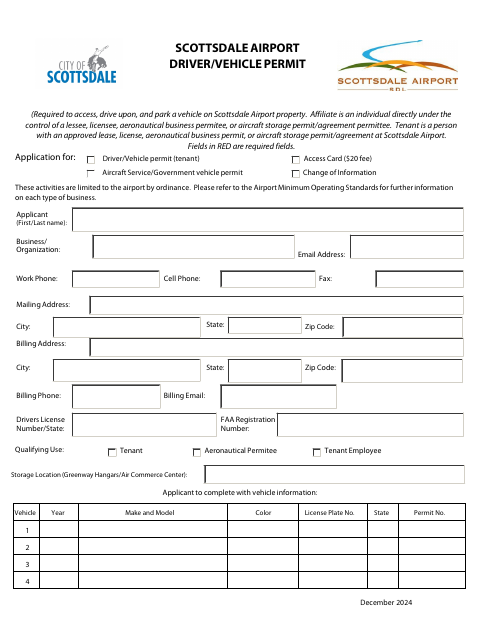
What this form is
The application requests a permit to access, drive on, or park a vehicle on Scottsdale Airport property, as well as an access card or change of information. It asks for applicant and business details, qualifying use, driver or aircraft information, and vehicle details. Applicants check applicable agreement attachments and agree to notify Airport Administration in writing within 15 days of information changes.
Who needs it
Airport tenants and other eligible applicants seeking a driver or vehicle permit, access card, or change of information use this form.
How to submit it
Save the completed form and submit it with an electronic signature to [email protected], or print, sign, and return it to 15255 N. Airport Drive, second floor, Scottsdale, AZ 85260.
About notarization
This document is signed without a notary; the applicant checks the signature affirmation, types their name as an official signature, and dates the form.
How to submit this form
- 1
Download The Application
Download and save the Airport Driver/Vehicle Permit form.
- 2
Complete The Form
Enter the requested applicant, business, qualifying-use, driver or aircraft, and vehicle information.
- 3
Gather Applicable Attachments
Check the box for each applicable lease, license, sublease, aircraft storage agreement, or aircraft storage permit submitted with the application.
- 4
Sign And Date The Form
Check the signature affirmation, type your name as your official signature, and date the application.
- 5
Submit To Airport Administration
Email the electronically signed form to [email protected], or print, sign, and return it to the address shown on the form.
Frequently asked questions
- Do I need a notary for the Airport Driver/Vehicle Permit?
- No. The applicant affirms the information is accurate by checking the box, typing their name as an official signature, and dating the form.
- How do I submit the Airport Driver/Vehicle Permit?
- Email the saved form with an electronic signature to [email protected], or print, sign, and return it to the Airport Drive address listed on the form.
- What information does the application request?
- It requests applicant and business contact details, qualifying use, driver or aircraft information, and vehicle details. Applicants also check any applicable agreement attachments.
Need something notarized?
This Airport Driver/Vehicle Permit doesn’t need a notary — but if you have another Scottsdale form that does, a commissioned online notary can help.