
Yavapai County, AZ · Yavapai County
Updated District Information
Special districts use this form to report changes to board membership or district contact information to Yavapai County.
At a glance
- Issued by
- City of Yavapai County · Yavapai County, Yavapai County, Arizona
- Notarization
- Not required: file this form without a notary.
- Official source
- yavapaiaz.gov
- Blank form
- Download the PDF
- Catalogued
- Machine-readable
- JSON record · about the forms index
What this form is
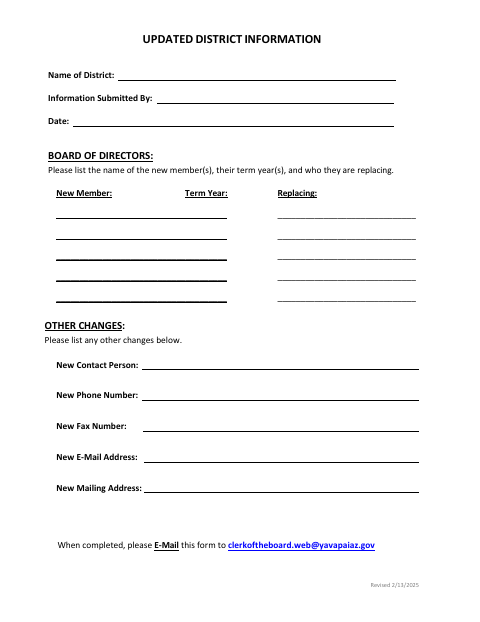
This form reports updated information for a district, including new board members, their term years, and whom they replace. It also collects changes to the contact person, phone, fax, email, or mailing address. The form directs districts to email it to the Clerk of the Board when completed.
Who needs it
A district representative can use this form to report board membership or contact information changes to Yavapai County.
How to submit it
Enter the district name, submitter, date, board changes, and any other changes. When completed, email the form to [email protected].
About notarization
This document is signed without a notary; no notarized or sworn attachment is mentioned, so the signer just signs and dates it.
How to submit this form
- 1
Download the Form
Download the Updated District Information form.
- 2
Complete the District Details
Enter the district name, submitter, date, board changes, and any other changes.
- 3
Review the Information
Check the listed board member, term year, replacement, and updated contact information.
- 4
Email the Form
When completed, email the form to [email protected].
Frequently asked questions
- What information does the Updated District Information form collect?
- It collects the district name, submitter, date, new board members, term years, replacements, and changes to district contact details.
- How do I submit the Updated District Information form?
- Complete the form and email it to the Clerk of the Board at [email protected], as directed on the form.
- Do I need a notary for the Updated District Information form?
- No. This document has no notary block and mentions no notarized or sworn attachment; the signer just signs and dates it.