
Placentia, CA · Orange County
Planning Application Worksheet
This worksheet collects project and contact details from applicants submitting a planning application to the City of Placentia.
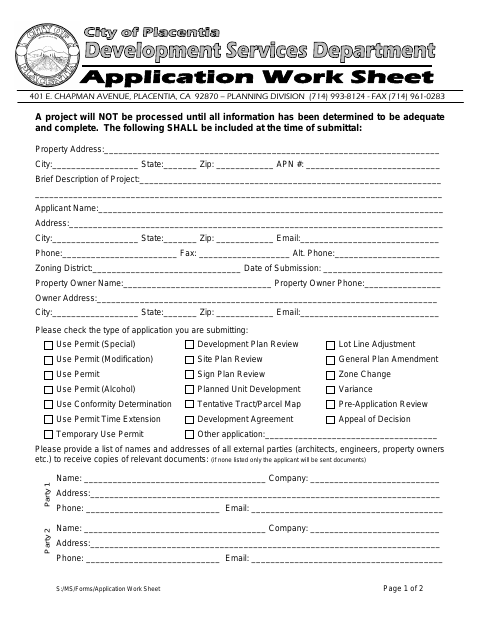
What this form is
Applicants use this worksheet to identify the property and project, select the type of planning application, and provide contact details for themselves, the property owner, and any external parties who should receive documents. The city says the application will not be processed until the information is adequate and complete; both applicant and property owner signatures are required, along with verification of the owner’s signature.
Who needs it
Anyone submitting a planning application to Placentia should complete this worksheet and obtain signatures from both the applicant and property owner.
How to submit it
Submit the completed worksheet to the Planning Division, 401 E. Chapman Avenue, Placentia, CA 92870; the form says all information must be adequate and complete before processing.
About notarization
This worksheet is signed without a required notary; the owner must present a driver’s-license copy, form notarization, or other agency-acceptable verification of the signature.
How to submit this form
- 1
Download The Worksheet
Download the Planning Application Worksheet PDF.
- 2
Complete The Worksheet
Fill in the property, project, applicant, owner, and external-party details, and select the application type.
- 3
Gather Signature Verification
Obtain applicant and property owner signatures. The owner must provide a driver’s-license copy, form notarization, or other acceptable verification.
- 4
Submit To The Planning Division
Submit the completed worksheet to the Planning Division at 401 E. Chapman Avenue, Placentia, CA 92870.
Frequently asked questions
- What does the Planning Application Worksheet ask for?
- It asks for property and project details, applicant and owner contact information, the application type, contacts for document copies, and applicant and owner signatures.
- Who needs to sign the worksheet?
- Both the applicant and the property owner must sign and date the worksheet. If they are the same person, the form provides a checkbox to indicate that.
- Do I need a notary for the Planning Application Worksheet?
- No. Both signatures are required, and the owner must provide verification of the owner’s signature. The form lists a driver’s-license copy, form notarization, or other acceptable verification as options.
- How do I submit the Planning Application Worksheet?
- Submit the completed worksheet to the Planning Division at 401 E. Chapman Avenue, Placentia, CA 92870. The city says processing requires adequate and complete information.