
Redlands, CA · San Bernardino County
Development Application Form
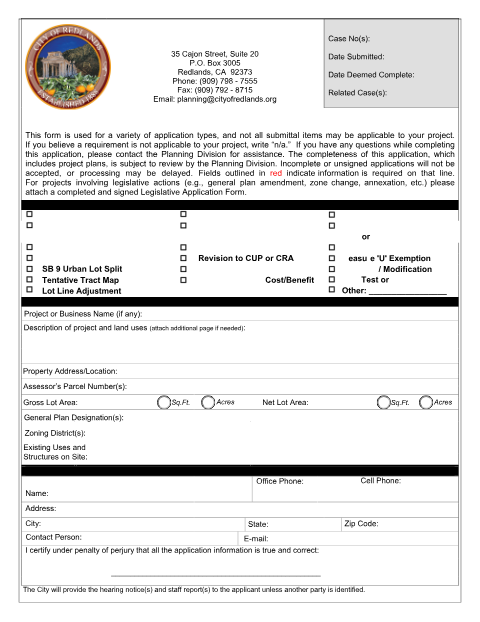
Redlands' master planning application covering Lot Line Adjustments, SB 9 Urban Lot Splits, Tentative Parcel/Tract Maps, and other entitlements, with an owner's affidavit page that must be sworn before a notary.
- California-licensed notary
- ~15 min average
- Notarized PDF emailed
What you’ll need
- Government-issued photo ID
- Webcam-enabled device (laptop or phone)
- This form, ready to upload as a PDF
What this form is
The City of Redlands uses a single Development Application Form to process a wide range of planning entitlements, including Lot Line Adjustments, SB 9 Urban Lot Splits, Tentative Parcel and Tract Maps, Conditional Use Permits, and Variances. Because several of these actions are recorded against the property, the property owner's affidavit page must be signed and subscribed and sworn before a notary before the Planning Division will deem the application complete.
Who needs it
Property owners or applicants in Redlands filing a lot line adjustment, SB 9 urban lot split, tentative map, or other planning entitlement.
Why it needs a notary
The owner's affidavit page includes jurat language requiring the signature to be 'subscribed and sworn to before me' a notary public.
How to get this notarized
- 1
Download the Form
Download the Development Application Form from the City of Redlands Planning Division.
- 2
Select Your Application Type
Check the box for your requested action (Lot Line Adjustment, SB 9 Urban Lot Split, Tentative Map, etc.).
- 3
Book an Online Notary
Schedule a remote online notarization session with Rush Notary.
- 4
Verify ID and Sign on Video
Show valid photo ID and sign the owner's affidavit live in front of the online notary.
- 5
Submit to the City
File the notarized application with the Redlands Planning Division along with required supplemental forms and plans.
Preview the form
The blank PDF straight from Redlands. Look it over, then upload your filled copy to start the notary session.

You’ll need ID and a webcam.
A licensed California online notary will join you on video, verify your government-issued ID, witness your signature, and apply their seal. You’ll receive the notarized PDF by email when the session ends.
Frequently asked questions
- How do I get my Redlands Development Application notarized?
- Upload the completed application, verify your ID on camera, and sign the owner's affidavit before an online notary during a short video session.
- Do I need a notary for a Redlands planning application?
- Yes, for entitlements processed through the Development Application Form. The owner's affidavit page must be subscribed and sworn before a notary.
- Can an out-of-state online notary sign for a Redlands filing?
- California recognizes out-of-state acknowledgments under Civil Code §1189(b) when the notarial act complies with that state's law; check with Redlands Planning if unsure.
- How long does the notarization take?
- Most remote sessions take about 20-25 minutes given the application's multiple signature and affidavit pages.
- What happens after notarization?
- Submit the notarized Development Application, along with any supplemental forms (such as the SB 9 Supplement) and project plans, to the Redlands Planning Division.