
Westminster, CO · Adams County
Individual Liquor License Checklist and Financial Consent
This checklist and consent form outline documents for an individual liquor license application and let an applicant authorize release of financial information for Westminster’s licensing investigation.
- licensed online notary
- ~15 min average
- Notarized PDF emailed
What you’ll need
- Government-issued photo ID
- Webcam-enabled device (laptop or phone)
- This form, ready to upload as a PDF
What this form is
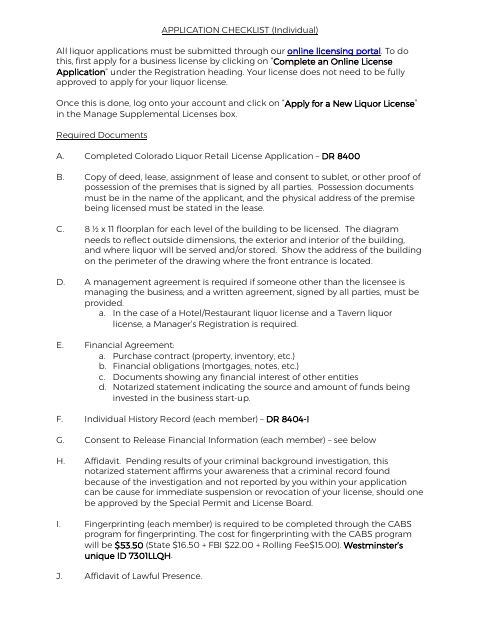
Westminster’s individual liquor application checklist describes the supporting materials applicants must submit through the city’s online licensing portal, including premises, financial, and personal-history documents. It also includes a consent authorizing release of financial information for a liquor or beer license investigation, with a notary block for the applicant’s signature. The checklist identifies a separate notarized affidavit concerning unreported criminal history as a required application document.
Who needs it
Individuals applying for a Westminster liquor or beer license should use the checklist and complete the financial-information consent as part of their application materials.
Why it needs a notary
The consent includes a state-and-county, witness-style notary block with a notary public signature and commission-expiration field; the applicant signs before the notary.
How to get this notarized
- 1
Download The Form
Download Westminster’s individual liquor license checklist and financial-information consent.
- 2
Review And Complete
Complete the consent and gather the supporting documents listed in the checklist for your application.
- 3
Book An Online Notary
Schedule a session with a commissioned online notary and have acceptable identification ready.
- 4
Sign On Video
Sign the consent during the live online notarization; do not sign it beforehand.
- 5
Submit To The City
Submit the notarized consent and required application materials through Westminster’s online licensing portal.
Preview the form
The blank PDF straight from Westminster. Look it over, then upload your filled copy to start the notary session.

You’ll need ID and a webcam.
A licensed online notary will join you on video, verify your government-issued ID, witness your signature, and apply their seal. You’ll receive the notarized PDF by email when the session ends.
Frequently asked questions
- How do I prepare the financial consent for notarization?
- Complete the applicant information, then sign the consent in front of the notary. The form’s notary block includes a notary public signature and commission-expiration field.
- Do I need to notarize the entire liquor license checklist?
- The checklist identifies a notarized statement about the source and amount of startup funds and a separate notarized affidavit about criminal-history disclosures. The included financial-information consent also has a notary block.
- Can I use an online notary for this form?
- Colorado authorizes remote online notarization by a commissioned online notary under C.R.S. §24-21-514.5. Confirm with the city or town if unsure whether it will accept your remotely notarized document.
- What else does the individual application checklist require?
- The checklist names items such as the Colorado Liquor Retail License Application, premises documents, floorplans, financial agreements, individual history records, and fingerprinting.