
Norfolk, CT · Litchfield County
Personal Property Short Form Declaration
Norfolk business and personal property owners use this four-page declaration to report taxable personal property to the Town Assessor and complete an affidavit when they no longer own or operate previously assessed property.
At a glance
- Issued by
- City of Norfolk · Norfolk, Litchfield County, Connecticut
- Notarization
- Required: sign this form in front of a notary before filing it.
- Official source
- norfolkct-media.s3.us-east-2.amazonaws.com
- Blank form
- Download the PDF
- Catalogued
- Machine-readable
- JSON record · about the forms index
- licensed online notary
- ~15 min average
- Notarized PDF emailed
What you’ll need
- Government-issued photo ID
- Webcam-enabled device (laptop or phone)
- This form, ready to upload as a PDF
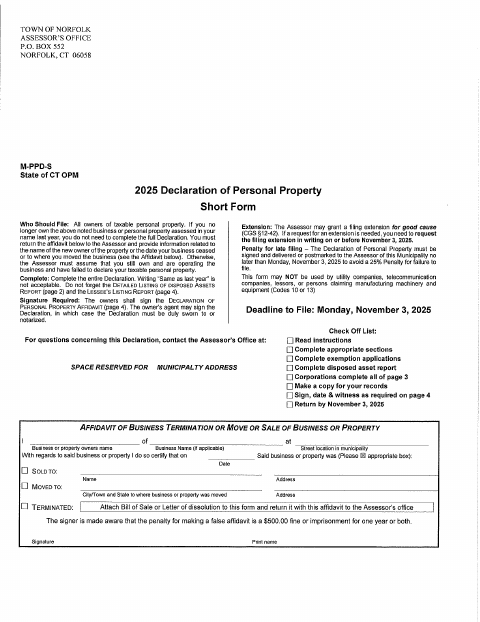
What this form is
The form collects information about taxable business personal property, including equipment, supplies, vehicles, and leased items, for the Town Assessor’s assessment. Owners complete the declaration and its required reports; an owner who no longer has previously assessed property can instead return the business termination, move, or sale affidavit with supporting information. The form says the declaration must be signed before filing and warns that improperly signed declarations may incur a penalty.
Who needs it
Owners of taxable personal property assessed in their name should file the declaration, while owners who no longer have that property should return the applicable affidavit to the Assessor.
How to get this notarized
- 1
Download the Form
Get the Town of Norfolk’s 2025 Personal Property Short Form Declaration.
- 2
Complete the Declaration
Fill in the applicable sections and reports; the form says writing “Same as last year” is not acceptable.
- 3
Book an Online Notary
If an agent is signing Section B, arrange a commissioned online notary for the sworn statement.
- 4
- 5
Submit to the Town
Deliver or mail the signed declaration and any required attachments to the Town Assessor.
Preview the form
The blank PDF straight from Norfolk. Look it over, then upload your filled copy to start the notary session.

You’ll need ID and a webcam.
A licensed online notary will join you on video, verify your government-issued ID, witness your signature, and apply their seal. You’ll receive the notarized PDF by email when the session ends.
Frequently asked questions
- How do I complete the personal property declaration?
- Complete the appropriate sections and reports, then sign the required affidavit. If an agent completes Section B, the agent must sign before a witness listed on the form, such as a notary.
- Do I need a notary for this form?
- The form says owners sign the declaration affidavit. An owner’s agent may sign, but the declaration must be sworn to or notarized, and the agent’s sworn statement must be witnessed.
- Can I sign the agent affidavit with a commissioned online notary?
- Connecticut authorizes remote online notarization for its own notaries under Public Act 23-28, effective October 1, 2023; Conn. Gen. Stat. §1-57 recognizes qualifying out-of-state notarial acts. Confirm acceptance with the Assessor.
- Where do I submit the completed declaration?
- The form instructs you to deliver or mail the completed declaration to the municipality’s Assessor. It lists the Town of Norfolk Assessor’s Office; confirm with the town clerk if unsure.