
Columbus, GA · Muscogee County
Digital Plans Affidavit Form
This affidavit identifies digital construction plans submitted to Columbus after plan review, and is signed by the design professional, contractor, or owner.
What this form is
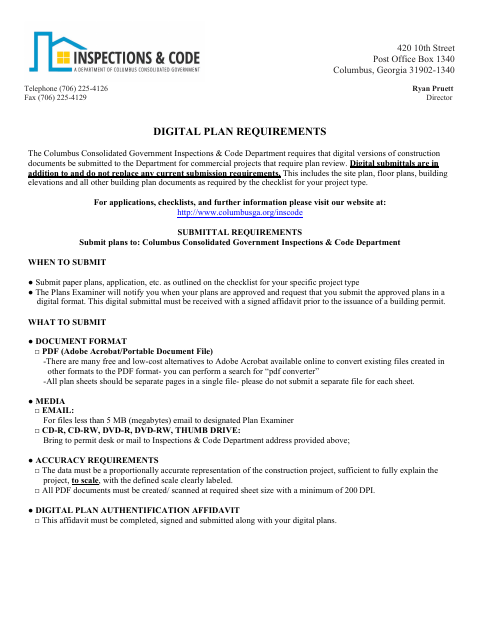
Columbus requires this affidavit with digital construction plans for commercial projects requiring plan review, after the Plans Examiner approves the originals and before a building permit is issued. The signer identifies the review and approval details and affirms that the digital plans match the approved plans or include the revisions requested for conditional approval. The digital submission supplements, rather than replaces, other submission requirements.
Who needs it
A design professional, contractor, or owner submitting digital construction plans for a commercial project requiring plan review needs to sign this affidavit.
How to submit it
Submit the signed affidavit with your digital plans to the Columbus Consolidated Government Inspections & Code Department. Email files under 5 MB to the designated Plan Examiner, or bring or mail them to the permit desk or the department address shown on the form.
About notarization
This affidavit is signed and dated without a notary; the document does not identify any notarized or sworn attachment.
How to submit this form
- 1
Download The Form
Download the Digital Plans Affidavit Form.
- 2
Complete The Affidavit
Identify the signer, submission date, plan approval details, and review number, then sign and date the form.
- 3
Prepare Digital Plans
Prepare the digital plans as PDFs and include any revisions requested for conditional approval.
- 4
Submit To The City
Send the signed affidavit with your digital plans to the Inspections & Code Department using a submission method listed on the form.
Frequently asked questions
- Do I need a notary for the Digital Plans Affidavit Form?
- No. The form calls for the design professional, contractor, or owner to sign and date it; it does not identify a notarized or sworn attachment.
- How do I submit the Digital Plans Affidavit Form?
- Submit it with your digital plans to the Inspections & Code Department. Email files under 5 MB to the designated Plan Examiner, or bring or mail them to the permit desk or department address on the form.
- When is the Digital Plans Affidavit Form required?
- The form says to submit the signed affidavit with digital plans after the Plans Examiner approves the originals and before a building permit is issued.
Need something notarized?
This Digital Plans Affidavit Form doesn’t need a notary — but if you have another Columbus form that does, a commissioned online notary can help.