
Monroe, LA · Ouachita Parish
Occupational License Affidavit Application
This application records business and owner information, estimated or actual gross receipts, and an applicant’s sworn certification for submission to the City of Monroe Tax & Revenue office.
At a glance
- Issued by
- City of Monroe · Monroe, Ouachita Parish, Louisiana
- Notarization
- Required: sign this form in front of a notary before filing it.
- Official source
- monroela.us
- Blank form
- Download the PDF
- Catalogued
- Machine-readable
- JSON record · about the forms index
- licensed online notary
- ~15 min average
- Notarized PDF emailed
What you’ll need
- Government-issued photo ID
- Webcam-enabled device (laptop or phone)
- This form, ready to upload as a PDF
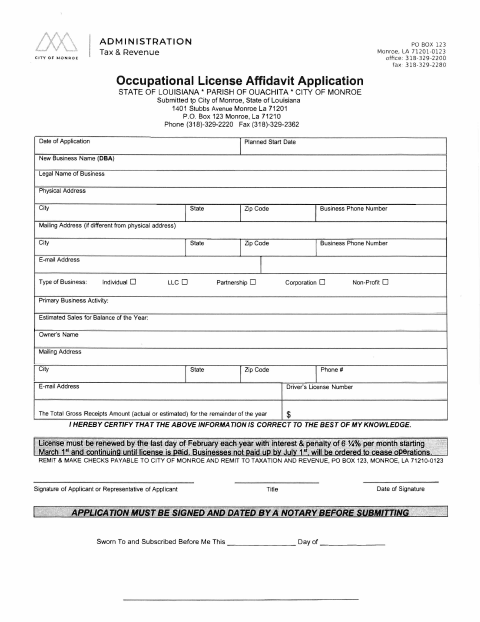
What this form is
The application collects business details, the owner’s contact information, the business activity, and gross receipts for the remainder of the year. The applicant certifies that the information is correct, and the form lists occupational license tax categories and fees. The City of Monroe form instructs applicants to sign and date the application before a notary and submit it to the city.
Who needs it
Applicants submitting this occupational license application to the City of Monroe, including an applicant’s representative signing on the applicant’s behalf, need this form.
Why it needs a notary
The application carries a sworn-to-and-subscribed-before-me jurat; the applicant or the applicant’s representative signs and swears to the application before the notary.
How to get this notarized
- 1
Download The Application
Get the Occupational License Affidavit Application from the City of Monroe.
- 2
Fill In The Application
Enter the business, owner, contact, business activity, and gross receipts information requested on the form.
- 3
Book An Online Notary
Arrange a remote appointment with a commissioned online notary for the application’s jurat.
- 4
Sign On Video
Sign and swear to the application during the online notarization appointment.
- 5
Submit It To The City
Submit the notarized application to the City of Monroe Tax & Revenue office using the address on the form.
Preview the form
The blank PDF straight from Monroe. Look it over, then upload your filled copy to start the notary session.

You’ll need ID and a webcam.
A licensed online notary will join you on video, verify your government-issued ID, witness your signature, and apply their seal. You’ll receive the notarized PDF by email when the session ends.
Frequently asked questions
- Who signs the occupational license application?
- The form provides for the applicant or the applicant’s representative to sign. The signer certifies that the information is correct and must sign and date the application before a notary.
- How do I submit the completed application?
- Complete the business and owner information, sign and date the application before a notary, then submit it to the City of Monroe Tax & Revenue office at the address shown on the form.
- Do I need to sign the application in front of a notary?
- Yes. The form says the application must be signed and dated by a notary before submission and includes a sworn-to-and-subscribed-before-me jurat.
- Can I use an online notary for this application?
- Louisiana authorizes remote online notarization by notaries commissioned in the state. Rush Notary can arrange signing with a commissioned online notary; confirm with the parish or municipality if unsure.