
Bloomington, MN · Hennepin County
Therapeutic Massage Enterprise License Application
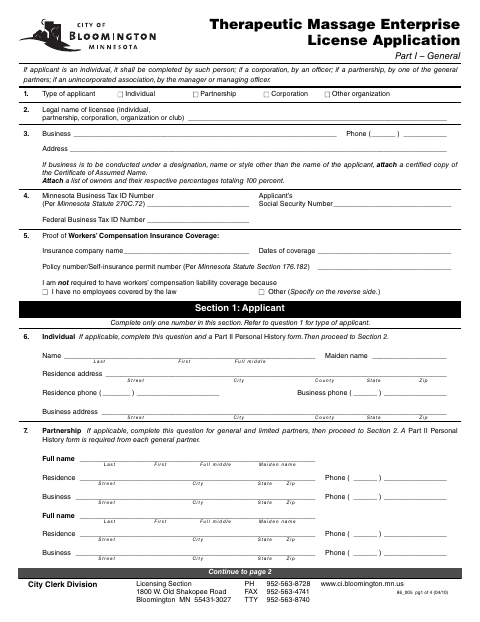
This four-page application collects business, ownership, financial, and premises information from individuals and organizations seeking a Bloomington therapeutic massage enterprise license.
At a glance
- Issued by
- City of Bloomington · Bloomington, Hennepin County, Minnesota
- Notarization
- Required: sign this form in front of a notary before filing it.
- Official source
- bloomingtonmn.gov
- Blank form
- Download the PDF
- Catalogued
- Machine-readable
- JSON record · about the forms index
- licensed online notary
- ~15 min average
- Notarized PDF emailed
What you’ll need
- Government-issued photo ID
- Webcam-enabled device (laptop or phone)
- This form, ready to upload as a PDF
What this form is
The application identifies the license applicant, people responsible for the premises, business assets and funding, and the location and layout of the massage business. Applicants provide supporting documents based on their business structure and circumstances, such as ownership lists, financial records, and premises plans. The form also includes statements about the city’s massage ordinance and zoning requirements, authorization for verification, and a sworn signature section.
Who needs it
Individuals and organizations applying for a Bloomington therapeutic massage enterprise license complete this form, with additional information and attachments required for their business structure.
Why it needs a notary
The form includes a subscribed-and-sworn jurat; the applicant signs the application before a notary public and swears that its information is truthful.
How to get this notarized
- 1
Download the Application
Get the Therapeutic Massage Enterprise License Application from the City of Bloomington.
- 2
Complete the Form
Fill in the applicant, business, ownership, financial, and premises sections and gather applicable attachments.
- 3
Book an Online Notary
Arrange an online notarization for the application’s subscribed-and-sworn jurat.
- 4
Sign on Video
Sign and swear to the application during your online notary session.
- 5
Submit to the City
Send the completed application and supporting documents to the City Clerk Division Licensing Section.
Preview the form
The blank PDF straight from Bloomington. Look it over, then upload your filled copy to start the notary session.

You’ll need ID and a webcam.
A licensed online notary will join you on video, verify your government-issued ID, witness your signature, and apply their seal. You’ll receive the notarized PDF by email when the session ends.
Frequently asked questions
- How do I complete the notary section?
- Complete the application, then sign and swear to it before a notary public. The form’s jurat provides spaces for the notarization date, notary signature, and commission expiration.
- Do I need to attach supporting documents?
- The form calls for documents based on your business structure and situation. Examples include an ownership list, business agreements or certificates, financial records, and premises plans.
- Can I use a commissioned online notary?
- Minnesota authorizes its notaries to perform remote online notarizations under Minn. Stat. §358.645. Ask whether the city will accept your remotely notarized application; confirm with the city if unsure.
- Who signs the application for a business?
- The form says an individual applicant completes it personally, a corporation’s officer signs, a general partner signs for a partnership, and a manager or managing officer signs for an unincorporated association.
Other forms in Bloomington
Affidavit of Consent
Bloomington
Alcoholic Beverage License Application Part 1
Bloomington
Alcoholic Beverage License Application Part II – Personal History
Bloomington
Body Art Establishment License Application Part I
Bloomington
Body Art Establishment License Application Part II – Personal History
Bloomington
Pawnbroker, Precious Metal or Secondhand Goods Dealer License Application Part II
Bloomington