
Jefferson, NH · Coos County
Short-Term Rental Conditional Use Permit Application
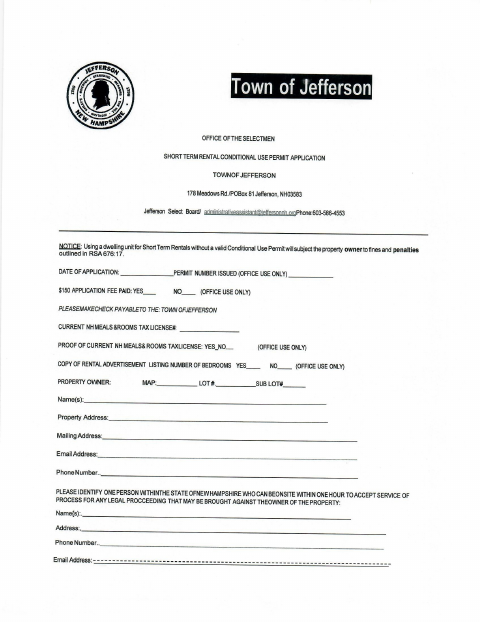
This application requests a Town of Jefferson conditional use permit for a short-term rental and is filed by the property owner seeking approval to rent the dwelling.
At a glance
- Issued by
- City of Jefferson · Jefferson, Coos County, New Hampshire
- Notarization
- Required: sign this form in front of a notary before filing it.
- Official source
- jeffersonnh.org
- Blank form
- Download the PDF
- Catalogued
- Machine-readable
- JSON record · about the forms index
- licensed online notary
- ~15 min average
- Notarized PDF emailed
What you’ll need
- Government-issued photo ID
- Webcam-enabled device (laptop or phone)
- This form, ready to upload as a PDF
What this form is
The application collects property and owner contact details, proof of a current New Hampshire Meals and Rooms Tax license, and information about the rental listing. The owner also swears to statements about safety equipment, occupancy, parking, and other rental conditions, and acknowledges permit responsibilities. The form says the Select Board approves or denies applications and that the permit must be renewed each year with a $150 fee.
Who needs it
A property owner applying to use a dwelling in Jefferson for short-term rentals must complete this application and provide the requested license proof and property information.
How to get this notarized
- 1
Download the Application
Get the Short-Term Rental Conditional Use Permit Application from the Town of Jefferson.
- 2
Fill Out the Form
Enter the property and owner details, provide the requested license information, and complete the affidavit without signing it ahead of notarization.
- 3
Book an Online Notary
Schedule a remote session with a commissioned online notary and have your identification ready.
- 4
Sign on Video
Appear on video and sign the affidavit when instructed by the notary.
- 5
Submit to the Town
Send the notarized application and requested supporting materials to the Town of Jefferson.
Preview the form
The blank PDF straight from Jefferson. Look it over, then upload your filled copy to start the notary session.

You’ll need ID and a webcam.
A licensed online notary will join you on video, verify your government-issued ID, witness your signature, and apply their seal. You’ll receive the notarized PDF by email when the session ends.
Frequently asked questions
- How do I notarize the Jefferson short-term rental permit application?
- Complete the application, then sign its affidavit during a video session with a commissioned online notary. Submit the notarized application and requested materials to the Town of Jefferson.
- Do I need to sign the affidavit in front of a notary?
- Yes. The application’s jurat says the named person appeared and made oath that the statements are true. Sign that affidavit before a notary or Justice of the Peace.
- Can I use a commissioned online notary for this form?
- New Hampshire authorizes its notaries to perform remote online notarizations under RSA 456-B:6-a, effective February 6, 2022. The form’s jurat must still be completed as directed.
- What should I include with my application?
- The form requests proof of a current New Hampshire Meals and Rooms Tax license and a copy of the rental advertisement listing the number of bedrooms. Confirm with the town if unsure.