
Hudson, NH · Hillsborough County
Barking And Animal Noise Affidavit
Hudson residents use this affidavit to report barking or other animal noise to the Hudson Police Department, documenting incident details and swearing that their account is true.
At a glance
- Issued by
- City of Hudson · Hudson, Hillsborough County, New Hampshire
- Notarization
- Required: sign this form in front of a notary before filing it.
- Official source
- hudsonnh.gov
- Blank form
- Download the PDF
- Catalogued
- Machine-readable
- JSON record · about the forms index
- licensed online notary
- ~15 min average
- Notarized PDF emailed
What you’ll need
- Government-issued photo ID
- Webcam-enabled device (laptop or phone)
- This form, ready to upload as a PDF
What this form is
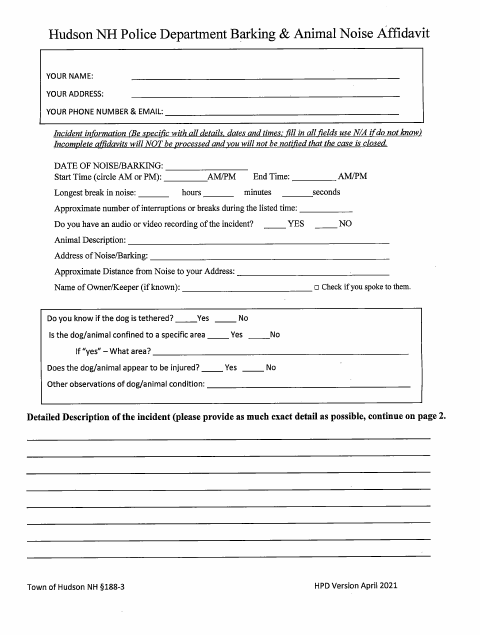
This affidavit records details about barking or animal noise, including dates, times, interruptions, the animal and its location, and the filer’s observations. The filer declares the information true under penalty of perjury and signs before a notary. The form states that incomplete affidavits will not be processed and refers to Town of Hudson NH §188-3.
Who needs it
A person reporting barking or animal noise in Hudson who wants to submit a detailed, sworn account to the Hudson Police Department needs this form.
Why it needs a notary
The form contains a sworn-to-and-subscribed jurat; the person making the declaration signs and dates it before the notary, who completes the notarial section.
How to get this notarized
- 1
Download The Affidavit
Get the Barking and Animal Noise Affidavit from the Hudson Police Department.
- 2
Fill In The Incident Details
Complete the required fields with specific dates, times, animal details, and observations. Use N/A when information is unknown.
- 3
Book An Online Notary
Arrange an online notarization with a commissioned online notary before signing.
- 4
Sign On Video
Appear for the online notarial session and sign the declaration when instructed.
- 5
Submit It To The City
Submit the completed affidavit to the Hudson Police Department.
Preview the form
The blank PDF straight from Hudson. Look it over, then upload your filled copy to start the notary session.

You’ll need ID and a webcam.
A licensed online notary will join you on video, verify your government-issued ID, witness your signature, and apply their seal. You’ll receive the notarized PDF by email when the session ends.
Frequently asked questions
- How do I complete and submit this affidavit?
- Fill in the incident details, including dates, times, animal information, and your observations. Sign before a notary, then submit the completed affidavit to the Hudson Police Department.
- Do I need to sign this affidavit in front of a notary?
- Yes. The form includes a sworn-to-and-subscribed jurat, so sign and date your declaration before the notary completes the notarial section.
- Can I use an online notary for this affidavit?
- New Hampshire authorizes remote online notarization by its notaries under RSA 456-B:6-a. The form requires a notarized signature; confirm with the town/city if unsure whether it will accept an online notarization.
- What happens if the affidavit is incomplete?
- The form says incomplete affidavits will not be processed and that you will not be notified when the case is closed. It instructs filers to use N/A when information is unknown.