
Grove, OK · Delaware County
Site Plan Permit Application
Grove’s Site Plan Permit Application is for property owners or authorized agents seeking Planning and Zoning Commission review of a proposed commercial or residential site plan.
- licensed online notary
- ~15 min average
- Notarized PDF emailed
What you’ll need
- Government-issued photo ID
- Webcam-enabled device (laptop or phone)
- This form, ready to upload as a PDF
What this form is
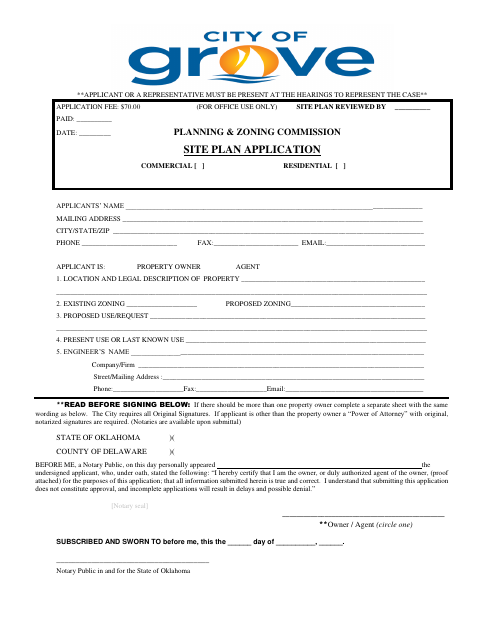
Use this application to provide the applicant and property details, existing and proposed zoning, intended use, and engineer information for a site plan review. Grove’s instructions say the application must be completed, signed by the applicant and property owner, notarized, and submitted with the fee and required supporting documents. An applicant or representative must attend hearings, and incomplete submissions may delay processing or result in denial.
Who needs it
Property owners or authorized agents applying for site plan review in Grove must complete the form and submit it with the required documents and fee.
How to get this notarized
- 1
Download the Application
Get Grove’s Site Plan Permit Application and review its instructions and submittal requirements.
- 2
Complete the Form
Enter applicant, property, zoning, proposed use, and engineer information; gather the listed supporting documents.
- 3
- 4
Sign on Video
Appear for the remote notarization and follow the notary’s instructions for signing and completing the oath.
- 5
Submit to the City
Submit the completed application, fee, and required supporting documents to Grove’s Planning & Zoning Office.
Preview the form
The blank PDF straight from Grove. Look it over, then upload your filled copy to start the notary session.

You’ll need ID and a webcam.
A licensed online notary will join you on video, verify your government-issued ID, witness your signature, and apply their seal. You’ll receive the notarized PDF by email when the session ends.
Frequently asked questions
- How do I complete the notarized application?
- Fill in the application, arrange for the property owner and applicant to sign as instructed, and have the applicant take the oath and sign before a notary. Submit it with the fee and required documents.
- Do I need to attend a hearing?
- Yes. The form states that the applicant or a representative must be present at hearings to represent the case.
- Can I use an online notary for this form?
- Oklahoma authorizes remote online notarization for its notaries, who must separately register with the Secretary of State. Oklahoma also recognizes notarial acts performed by authorized officers of another state. The form calls for original signatures, so confirm with Grove whether it accepts a remotely notarized submission.
- What supporting documents does Grove request?
- The application lists dimensioned site plans, a legal description, vicinity map, proof of ownership or qualifying lease, tax status verification, and notarized owner authorization or power of attorney when applicable. It also allows for other required documents.
- Where should I submit the application?
- The form directs applicants to submit the application and required information to the Planning & Zoning Office according to the enclosed time schedule. Confirm with the city or county clerk if unsure.