
Richmond, RI · Washington County
Owner’s Authorization for Subdivision or Land Development
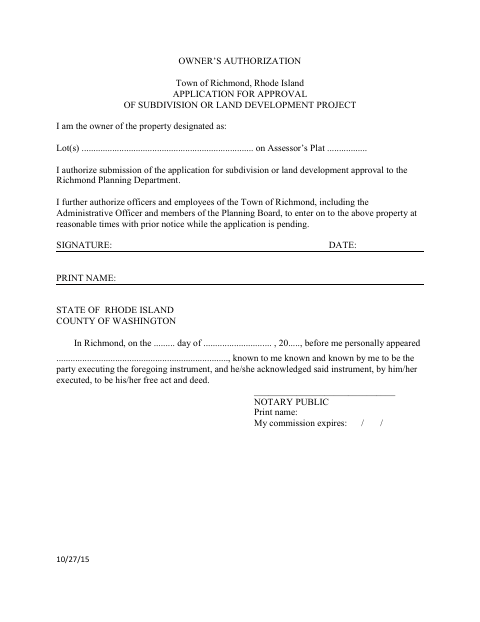
This form authorizes the Richmond Planning Department to receive a subdivision or land development application and permits town officials to enter the property at reasonable times with prior notice while the application is pending.
- licensed online notary
- ~15 min average
- Notarized PDF emailed
What you’ll need
- Government-issued photo ID
- Webcam-enabled device (laptop or phone)
- This form, ready to upload as a PDF
What this form is
Property owners use this form to authorize submission of an application for subdivision or land development approval to the Richmond Planning Department. It also authorizes Richmond officers and employees, including the Administrative Officer and Planning Board members, to enter the property at reasonable times with prior notice while the application is pending. The form has separate sections for an individual owner and a business entity.
Who needs it
A property owner—or an authorized person signing for a business entity—uses this form for a subdivision or land development approval application in Richmond.
Why it needs a notary
The form contains an acknowledgment stating that the signer appeared before the notary and acknowledged the instrument as their free act and deed.
How to get this notarized
- 1
Download the Form
Get the Owner’s Authorization form from the Town of Richmond.
- 2
Complete the Owner Section
Enter the lot and assessor’s plat, then complete the individual or business entity section that applies.
- 3
Book an Online Notary
Schedule a remote online notarization with a commissioned online notary.
- 4
Sign on Video
Sign the form during the video session and have the notary complete the acknowledgment.
- 5
Submit to the Town
Submit the notarized authorization with the application to the Richmond Planning Department.
Preview the form
The blank PDF straight from Richmond. Look it over, then upload your filled copy to start the notary session.

You’ll need ID and a webcam.
A licensed online notary will join you on video, verify your government-issued ID, witness your signature, and apply their seal. You’ll receive the notarized PDF by email when the session ends.
Frequently asked questions
- How do I complete the owner’s authorization?
- Identify the property by lot and assessor’s plat, complete the applicable individual or business entity section, then sign before a notary. Submit the completed form with the application to the Richmond Planning Department.
- Do I need to sign this form in front of a notary?
- Yes. The form includes an acknowledgment for the owner or business representative to sign before a notary, who completes the appearance details and commission information.
- Can I sign the form with a remote online notary?
- Rhode Island authorizes remote online notarization under R.I. Gen. Laws §§42-30.1-12.1 and 42-30.1-12.2. A commissioned online notary can notarize your signature by video; ask the Planning Department whether it accepts the remotely notarized form.
- Where do I submit the completed form?
- The form authorizes submission of the application to the Richmond Planning Department. Confirm any filing or document-submission instructions with the department; confirm with the city or town clerk if unsure.
Other forms in Richmond
Affidavit of Compliance
Richmond
Alcoholic Beverage License Application and Affidavit
Richmond
Alcoholic Beverage License Application
Richmond
Alcoholic Beverage License Application Checklist and Fact Sheet
Richmond
Alcoholic Beverage License Application Checklist and Compliance Affidavit
Richmond
Dog Boarding Kennel or Dog Breeding Kennel Application
Richmond