
Robinson, TX · McLennan County
Application for Time Payment, Extension, or Community Service
This sworn application lets Robinson Municipal Court defendants request more time to pay, a payment plan, or community service and provide financial information supporting their request.
- licensed online notary
- ~15 min average
- Notarized PDF emailed
What you’ll need
- Government-issued photo ID
- Webcam-enabled device (laptop or phone)
- This form, ready to upload as a PDF
What this form is
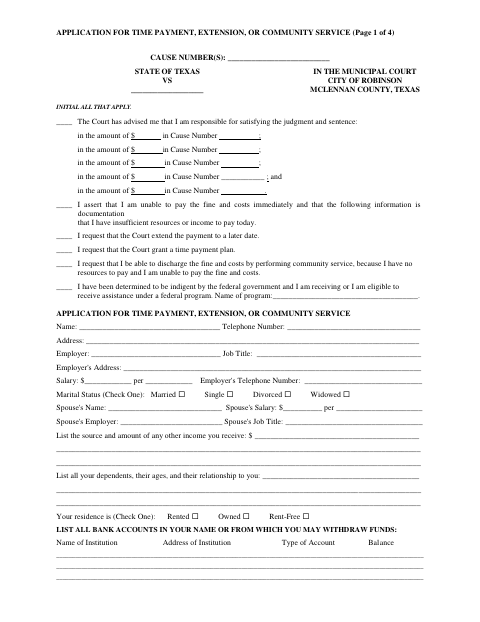
The application asks defendants to identify the requested option and provide information about income, expenses, property, debts, and financial assistance. Robinson Municipal Court uses the application to consider a request related to a judgment and sentence; the accompanying evidence checklist identifies documents to bring to the hearing. The applicant also swears that the information is true, correct, and complete to the best of their knowledge and belief.
Who needs it
A defendant with a Robinson Municipal Court judgment who seeks an extension, time payment plan, or community service based on inability to pay may need this application.
Why it needs a notary
The form includes a sworn-and-subscribed jurat, and the defendant signs the application before the judge, clerk, or deputy clerk acting as the notary.
How to get this notarized
- 1
Download The Application
Get the Application for Time Payment, Extension, or Community Service and its accompanying evidence checklist.
- 2
Complete The Form
Enter your case and financial information, select the request you are making, and initial the statements that apply.
- 3
Book An Online Notary
Schedule an appointment with a commissioned online notary and have identification and the unsigned application ready.
- 4
Sign On Video
Wait to sign until instructed during the online notarization; the defendant must swear to the application before the notary.
- 5
Submit To The City
Bring or submit the notarized application and requested supporting documents as directed by Robinson Municipal Court.
Preview the form
The blank PDF straight from Robinson. Look it over, then upload your filled copy to start the notary session.

You’ll need ID and a webcam.
A licensed online notary will join you on video, verify your government-issued ID, witness your signature, and apply their seal. You’ll receive the notarized PDF by email when the session ends.
Frequently asked questions
- How do I complete this application?
- Fill in the requested financial details, select the relief you are seeking, initial the applicable statements, and bring supporting documents to your hearing as directed by the form.
- Do I need to sign the application before a notary?
- Yes. The application says it must be sworn and subscribed before an authorized official. Sign during the notarization appointment, not beforehand.
- Can I use a remote online notary for this form?
- Texas has authorized remote online notarization since 2018 under Government Code Chapter 406, Subchapter C. Ask the court whether it accepts a remotely notarized application; confirm with the city if unsure.
- What financial records should I bring to the hearing?
- The form lists items such as a recent tax return, three months of bank statements and pay stubs, and proof of housing, utilities, transportation, medical expenses, and benefits.