
Santa Clara, UT · Washington County
Single Event Liquor License Application
This application is for individuals or businesses seeking a Santa Clara permit to sell specified alcoholic beverages at a single special event.
- licensed online notary
- ~15 min average
- Notarized PDF emailed
What you’ll need
- Government-issued photo ID
- Webcam-enabled device (laptop or phone)
- This form, ready to upload as a PDF
What this form is
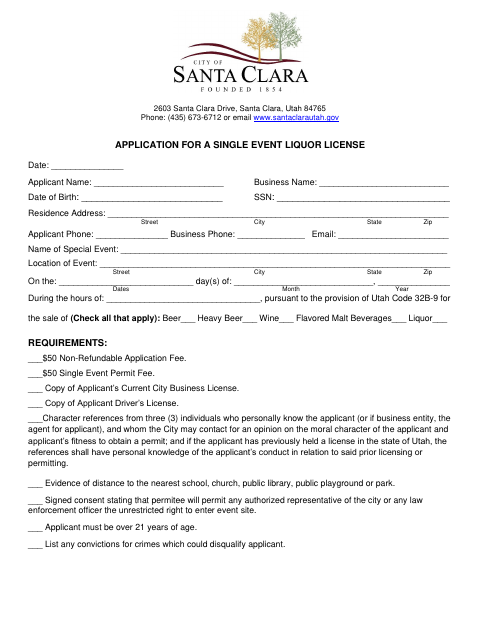
Use this form to apply for a permit to sell selected beverages at a special event, providing applicant, business, event, and schedule details. The application lists required fees and supporting materials, including a business license, identification, character references, and distance evidence. The applicant certifies that the information is true and agrees to comply with city requirements; the city may require City Council approval.
Who needs it
An individual or business seeking a Santa Clara permit to sell beer, wine, liquor, or other listed beverages at a single special event needs this application.
Why it needs a notary
The application includes a jurat stating it was sworn before a notary; the applicant signs the certification in the notary’s presence.
How to get this notarized
- 1
Download The Application
Download the Single Event Liquor License Application and review its requirements.
- 2
Fill In The Application
Enter applicant, business, event, beverage, and schedule information, and gather the listed supporting materials.
- 3
Book An Online Notary
Arrange a session with a commissioned online notary before signing the applicant certification.
- 4
Sign On Video
Sign the certification during the video session as directed so the notary can complete the jurat.
- 5
Submit To The City
Submit the notarized application, fees, and supporting materials to the city as instructed.
Preview the form
The blank PDF straight from Santa Clara. Look it over, then upload your filled copy to start the notary session.

You’ll need ID and a webcam.
A licensed online notary will join you on video, verify your government-issued ID, witness your signature, and apply their seal. You’ll receive the notarized PDF by email when the session ends.
Frequently asked questions
- How do I get the application notarized online?
- Complete the application, then book with a commissioned online notary. Sign the applicant certification during the video session when directed, and follow the city’s instructions for submitting the completed form and attachments.
- Do I need to sign the application in front of a notary?
- Yes. The form includes a jurat stating that the application was sworn before a notary. The applicant signs the certification in the notary’s presence.
- What documents and information does the application request?
- It asks for applicant and event details and lists fees, a current city business license, a driver’s license copy, character references, distance evidence, and other required statements or information.
- Can I use an online notary for this form?
- Utah authorizes remote notarization by a commissioned online notary. Ask the city whether it accepts a remotely notarized copy and how to submit it; confirm with the city or county recorder if unsure.
Other forms in Santa Clara
Annexation/Boundary Adjustment Application
Santa Clara
Commercial Site Plan Application
Santa Clara
Construction Site Maintenance Agreement
Santa Clara
General Plan Amendment Application
Santa Clara
On-Premise Alcoholic Beverage License Application
Santa Clara
Petition to Abandon a Lot Line and Vacate Associated Easement
Santa Clara