
Eloy, AZ · Pinal County
Aviation Easement and Covenant Waiver Agreement
This agreement grants an aviation easement and records property restrictions for owners seeking a residential development waiver in Eloy’s AO-2 Aviation Overlay District.
- licensed online notary
- ~15 min average
- Notarized PDF emailed
What you’ll need
- Government-issued photo ID
- Webcam-enabled device (laptop or phone)
- This form, ready to upload as a PDF
What this form is
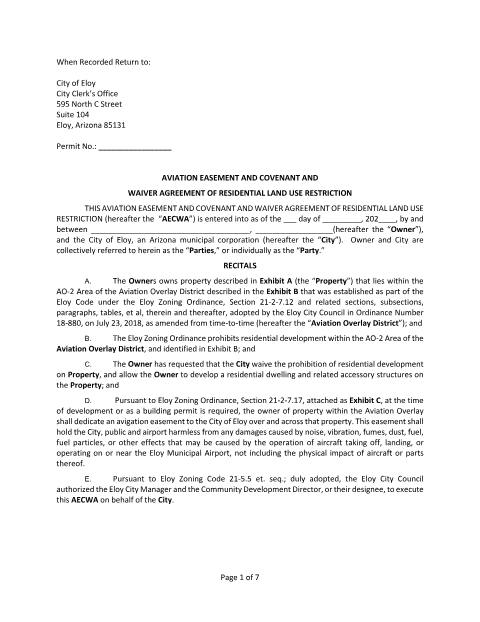
The agreement grants the City of Eloy a perpetual avigation easement and records covenants, acknowledgments, waivers, and airport-related obligations that run with the property. The form says owners within the Aviation Overlay must dedicate an avigation easement at development or when a building permit is required; this agreement also requests a waiver to allow a dwelling and related accessory structures in the AO-2 Area. It includes property and overlay legal-description exhibits for recording.
Who needs it
Property owners seeking City of Eloy approval for a residential dwelling and related accessory structures on property within the AO-2 Aviation Overlay Area need this agreement.
Why it needs a notary
The form carries acknowledgment blocks for the owner and City representative; each signer must personally appear before a notary, establish identity by satisfactory evidence, and acknowledge signing.
How to get this notarized
- 1
Download the Agreement
Download the Aviation Easement and Covenant Waiver Agreement from the City of Eloy.
- 2
Complete the Form
Fill in the owner, permit, date, and property details, and attach the required property legal description.
- 3
Book an Online Notary
Schedule a live audio-video appointment with a commissioned online notary for the owner and City acknowledgment blocks.
- 4
Sign on Video
Appear on video, establish your identity, and sign when directed by the notary.
- 5
Submit to the City
Follow the City of Eloy's instructions for execution and recording; the form names the City Clerk's Office as the return destination.
Preview the form
The blank PDF straight from Eloy. Look it over, then upload your filled copy to start the notary session.

You’ll need ID and a webcam.
A licensed online notary will join you on video, verify your government-issued ID, witness your signature, and apply their seal. You’ll receive the notarized PDF by email when the session ends.
Frequently asked questions
- How do I notarize this aviation easement agreement online?
- Book a live audio-video session with a commissioned online notary. The owner and City representative sign and acknowledge the agreement before the notary, following the form’s acknowledgment blocks.
- Do I need to notarize the owner and City signature blocks?
- The agreement includes separate acknowledgment blocks for the owner and the City representative, each stating that the signer appeared before a notary and acknowledged signing.
- When does Eloy require an avigation easement?
- The attached zoning provision says an owner in the Aviation Overlay shall dedicate an avigation easement at the time of development or when a building permit is required.
- Can a commissioned online notary notarize this agreement?
- Arizona has authorized remote online notarization for its own notaries since July 2020 and recognizes notarial acts performed by notaries of other states. Rush Notary sessions are performed by a commissioned online notary over live audio-video; confirm with the city/town if unsure.