
Middlebury, CT · New Haven County
Pistol Permit and Eligibility Certificate Application
This Connecticut State Police application requests a pistol permit or firearms eligibility certificate and is completed by applicants submitting it to the appropriate local authority.
At a glance
- Issued by
- City of Middlebury · Middlebury, New Haven County, Connecticut
- Notarization
- Required: sign this form in front of a notary before filing it.
- Official source
- middleburyct.gov
- Blank form
- Download the PDF
- Catalogued
- Machine-readable
- JSON record · about the forms index
- licensed online notary
- ~15 min average
- Notarized PDF emailed
What you’ll need
- Government-issued photo ID
- Webcam-enabled device (laptop or phone)
- This form, ready to upload as a PDF
What this form is
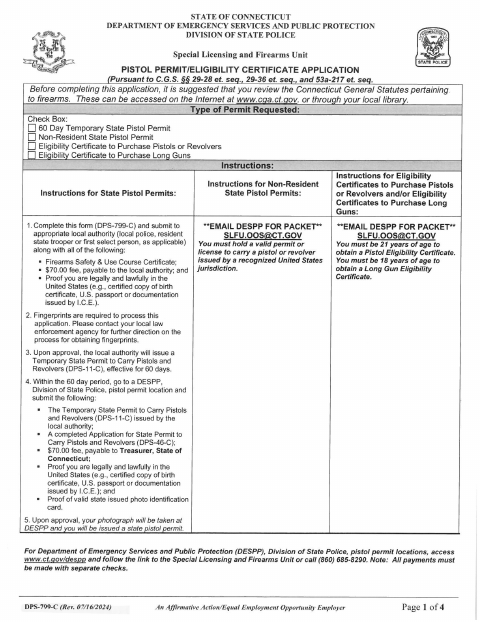
The four-page DPS-799-C application lets an applicant request a 60-day temporary state pistol permit, a non-resident state pistol permit, or an eligibility certificate for purchasing pistols, revolvers, or long guns. Applicants provide identifying details, address and employment history, and responses about medical, criminal, and military history, then sign the declaration under oath. The form instructs applicants to submit it with required supporting documents and fees to the appropriate local authority.
Who needs it
Anyone applying for one of the pistol permits or firearms eligibility certificates listed on the form must complete it and submit it to the appropriate local authority.
Why it needs a notary
The declaration carries a subscribed-and-sworn jurat; the applicant signs and swears that the application answers are true and correct before the notary.
How to get this notarized
- 1
Download the Application
Get the DPS-799-C application and review the instructions for the permit or eligibility certificate you are requesting.
- 2
Fill Out the Form
Complete the application and gather the supporting documents and fees listed in the instructions.
- 3
Book an Online Notary
Schedule a remote session with a commissioned online notary for the application’s sworn declaration.
- 4
Sign on Video
Sign and swear to the truth of your answers during the online notarization session.
- 5
Submit to the Local Authority
Submit the notarized application and required materials to the appropriate local authority as directed by the form.
Preview the form
The blank PDF straight from Middlebury. Look it over, then upload your filled copy to start the notary session.

You’ll need ID and a webcam.
A licensed online notary will join you on video, verify your government-issued ID, witness your signature, and apply their seal. You’ll receive the notarized PDF by email when the session ends.
Frequently asked questions
- How do I get the application notarized online?
- Complete the form, then book a session with a commissioned online notary. Sign and swear to the declaration during the video session, and follow the form’s instructions for submitting your application and supporting documents.
- Do I need to sign in front of a notary?
- Yes. The form’s declaration includes a subscribed-and-sworn jurat, so the applicant must sign and swear that the answers are true and correct before a notary.
- Can this form be notarized remotely in Connecticut?
- Connecticut permits its notaries to perform remote online notarizations under Public Act 23-28, codified at Conn. Gen. Stat. §3-95b. This application is not among the document types excluded by that law; confirm acceptance with the local authority before proceeding.
- Where do I submit the completed application?
- The form says to submit it to the appropriate local authority, such as local police, a resident state trooper, or the first selectperson, as applicable. Confirm with the town clerk if unsure.
Other forms in Middlebury
Pistol Permit and Eligibility Certificate Application in other Connecticut cities
Each city publishes its own version of this form. Pick the city where you’re filing.