
Griffin, GA · Spalding County
Owner's Authorization Affidavit
A notarized affidavit a property owner signs authorizing a representative to file a planning or zoning application on their behalf in Griffin.
- licensed online notary
- ~15 min average
- Notarized PDF emailed
What you’ll need
- Government-issued photo ID
- Webcam-enabled device (laptop or phone)
- This form, ready to upload as a PDF
What this form is
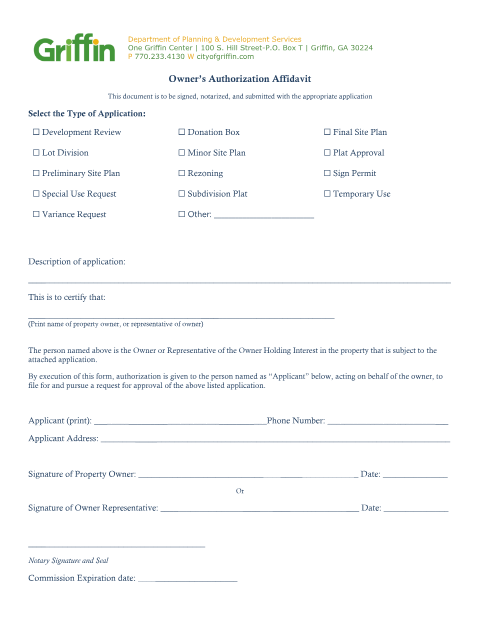
Griffin's Planning & Development Services requires this affidavit whenever someone other than the property owner submits a planning, zoning, or development application. The owner certifies their authorization for the representative, and the form must be signed and notarized before it is submitted with the application.
Who needs it
Property owners in Griffin authorizing an agent, developer, or representative to file a planning or zoning application.
Why it needs a notary
The form states plainly that the document is to be signed, notarized, and submitted with the appropriate application.
How to get this notarized
- 1
Download the Affidavit
Get the Owner's Authorization Affidavit from the city website.
- 2
Select the Application Type
Describe the planning or zoning application being authorized.
- 3
Book Online Notary
Schedule a remote online notarization session.
- 4
Sign on Video
Sign the affidavit before the notary with your ID.
- 5
Submit to the City
File the notarized affidavit with the planning or zoning application.
Preview the form
The blank PDF straight from Griffin. Look it over, then upload your filled copy to start the notary session.

You’ll need ID and a webcam.
A licensed online notary will join you on video, verify your government-issued ID, witness your signature, and apply their seal. You’ll receive the notarized PDF by email when the session ends.
Frequently asked questions
- Do I need a notary for the owner's authorization affidavit?
- Yes — the form states it must be signed, notarized, and submitted with the planning or zoning application.
- How do I notarize this online?
- Upload the affidavit and sign it before a commissioned notary during a live video session.
- Who signs this affidavit?
- The property owner, or a representative of the owner, certifying authorization for the listed application.