
Olive Branch, MS · DeSoto County
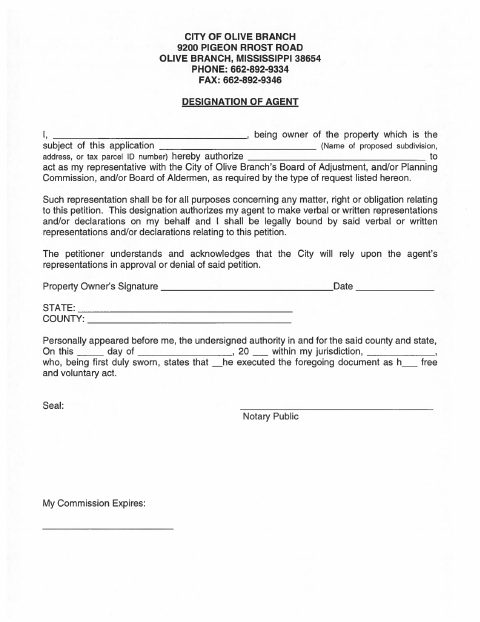
Designation of Agent
Property owners use this form to authorize an agent to represent them before the Olive Branch Board of Adjustment, Planning Commission, or Board of Aldermen regarding a petition.
At a glance
- Issued by
- City of Olive Branch · Olive Branch, DeSoto County, Mississippi
- Notarization
- Required: sign this form in front of a notary before filing it.
- Official source
- obms.us
- Blank form
- Download the PDF
- Catalogued
- Machine-readable
- JSON record · about the forms index
- licensed online notary
- ~15 min average
- Notarized PDF emailed
What you’ll need
- Government-issued photo ID
- Webcam-enabled device (laptop or phone)
- This form, ready to upload as a PDF
What this form is
The form lets a property owner name an agent to represent them in matters concerning a petition before the City of Olive Branch’s Board of Adjustment, Planning Commission, and/or Board of Aldermen. It authorizes the agent to make verbal or written representations on the owner’s behalf, which may legally bind the owner. Use it when you want an agent to act for you regarding a property-related application or petition.
Who needs it
A property owner who wants an agent to represent them before one or more listed Olive Branch boards regarding a petition should complete this form.
Why it needs a notary
The form includes a sworn statement (jurat) block; the property owner signs the designation and swears before the notary that it is their free and voluntary act.
How to get this notarized
- 1
Download the Form
Get the City of Olive Branch Designation of Agent form.
- 2
Fill In the Details
Enter the property owner’s name, property description, and the agent’s name.
- 3
Book an Online Notary
Arrange a session with a commissioned online notary and have the form ready.
- 4
Sign on Video
Appear for the notarial session and sign and swear to the statement as directed.
- 5
Submit to the City
Send the completed, notarized form to the City of Olive Branch with the related petition.
Preview the form
The blank PDF straight from Olive Branch. Look it over, then upload your filled copy to start the notary session.

You’ll need ID and a webcam.
A licensed online notary will join you on video, verify your government-issued ID, witness your signature, and apply their seal. You’ll receive the notarized PDF by email when the session ends.
Frequently asked questions
- How do I complete the Designation of Agent form?
- Identify yourself as the property owner, describe the property, name your agent, then sign and swear to the statement before a notary. The form says the agent may make verbal or written representations on your behalf.
- Do I need to sign this form in front of a notary?
- Yes. The form contains a statement that you personally appear, are duly sworn, and execute the document as your free and voluntary act. Sign the form before the notary completes the certificate.
- Can I use an online notary for this form?
- Mississippi requires its own notaries to have the signer physically present under Miss. Code §25-34-15, but recognizes qualifying acts by authorized officers of another state under §25-34-23. A commissioned online notary may be an option; confirm acceptance with the city.
- Where do I submit the completed designation?
- The form names the City of Olive Branch’s Board of Adjustment, Planning Commission, and Board of Aldermen in connection with the petition. Confirm the correct submission method and destination with the city; confirm with the city or chancery clerk if unsure.