
Plandome, NY · Nassau County
Design Review Board Contractor Affidavit
This affidavit lets a licensed Nassau County contractor certify plans for approved work and is submitted to the Village of Plandome for Design Review Board projects.
- licensed online notary
- ~15 min average
- Notarized PDF emailed
What you’ll need
- Government-issued photo ID
- Webcam-enabled device (laptop or phone)
- This form, ready to upload as a PDF
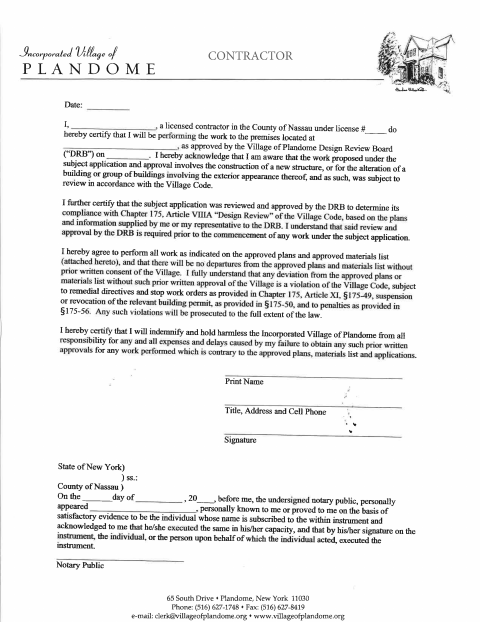
What this form is
The contractor certifies that they will perform work approved by the Village of Plandome Design Review Board and follow the approved plans and materials list. The form states that DRB review and approval are required before work begins and that changes need the Village’s prior written consent. The contractor also acknowledges potential consequences for unauthorized deviations and agrees to indemnify and hold harmless the Village for related expenses and delays.
Who needs it
A licensed Nassau County contractor performing work at a Plandome property approved by the Village Design Review Board needs to complete this affidavit.
Why it needs a notary
The form carries an acknowledgment block; the contractor whose name appears on the affidavit must personally appear before the notary and acknowledge signing it.
How to get this notarized
- 1
Download the Affidavit
Get the Design Review Board Contractor Affidavit from the Village of Plandome.
- 2
Fill In the Form
Enter the contractor, license, property, approval, and contact information requested on the form.
- 3
Book an Online Notary
Schedule a remote session with a commissioned online notary.
- 4
Sign on Video
Appear for the video session and acknowledge your signature before the notary.
- 5
Submit to the Village
Send the notarized affidavit to the Village of Plandome as directed.
Preview the form
The blank PDF straight from Plandome. Look it over, then upload your filled copy to start the notary session.

You’ll need ID and a webcam.
A licensed online notary will join you on video, verify your government-issued ID, witness your signature, and apply their seal. You’ll receive the notarized PDF by email when the session ends.
Frequently asked questions
- How do I get the Plandome contractor affidavit notarized online?
- Complete the affidavit, book a session with a commissioned online notary, and sign during the video session. Submit the notarized form to the Village as directed.
- Do I need to sign the affidavit in front of a notary?
- Yes. The form includes an acknowledgment block requiring the contractor to personally appear before a notary and acknowledge signing the instrument.
- Can I use an online notary for this form?
- New York authorizes its notaries to perform remote online notarizations under Executive Law §135-c. A commissioned online notary can guide you through signing during a video session.
- What should I do if I am unsure how to submit the form?
- Follow the Village’s submission instructions. If you are unsure about its requirements or how to file the completed affidavit, confirm with the city, town or village if unsure.