
Glocester, RI · Providence County
Zoning Modification Application
This application requests a zoning modification in Glocester and is filed by an applicant seeking a change for a property, with signatures from all parties named on the deed.
At a glance
- Issued by
- City of Glocester · Glocester, Providence County, Rhode Island
- Notarization
- Required: sign this form in front of a notary before filing it.
- Official source
- glocesterri.gov
- Blank form
- Download the PDF
- Catalogued
- Machine-readable
- JSON record · about the forms index
- licensed online notary
- ~15 min average
- Notarized PDF emailed
What you’ll need
- Government-issued photo ID
- Webcam-enabled device (laptop or phone)
- This form, ready to upload as a PDF
What this form is
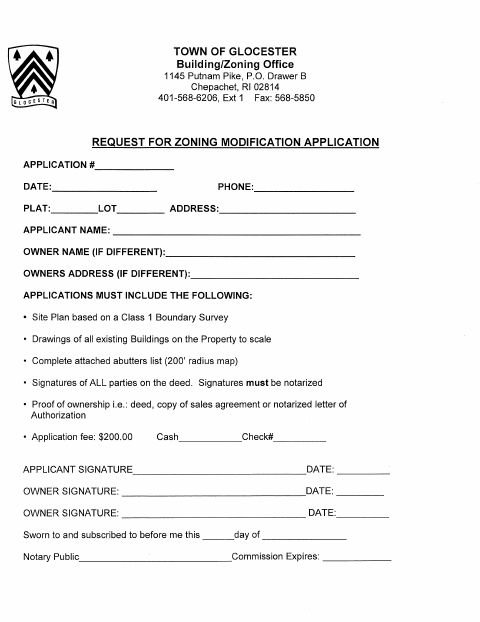
The Town of Glocester Building/Zoning Office application requests property and applicant details, including the plat, lot, address, and owner information. The form says applications must include a Class 1 Boundary Survey site plan, scaled drawings of existing buildings, a complete abutters list with a 200-foot radius map, signatures from all deed parties, proof of ownership, and a $200 fee.
Who needs it
An applicant requesting a zoning modification in Glocester must submit this application with the listed property documents, fee, and signatures from all parties on the deed.
Why it needs a notary
The form carries a sworn-to-and-subscribed jurat; the applicant and all parties on the deed must sign as required before a notary public.
How to get this notarized
- 1
Download the Application
Get the Zoning Modification Application from the Town of Glocester.
- 2
Complete the Form
Enter the requested application, property, applicant, and owner details; gather the listed plans, abutters list, proof of ownership, and fee.
- 3
Book an Online Notary
Arrange an online notarization for the required signatures of all parties on the deed.
- 4
Sign on Video
Each required signer completes the notarized signature process during the online video session.
- 5
Submit to the Town
Send the completed application, notarized signatures, supporting documents, and fee to the Building/Zoning Office.
Preview the form
The blank PDF straight from Glocester. Look it over, then upload your filled copy to start the notary session.

You’ll need ID and a webcam.
A licensed online notary will join you on video, verify your government-issued ID, witness your signature, and apply their seal. You’ll receive the notarized PDF by email when the session ends.
Frequently asked questions
- How do I get the zoning modification application notarized?
- Complete the application, then book a session with a commissioned online notary. Sign the required notarized portion during the video session and submit the completed application and supporting materials to the Town.
- Do I need every deed party to sign?
- The application says signatures of all parties on the deed are required and must be notarized. Check the deed and arrange for each required signer to complete the notarization.
- Can I use an online notary for this form?
- Rhode Island law authorizes remote online notarization by a commissioned online notary under R.I. Gen. Laws §42-30.1-12.1 and §42-30.1-12.2. Ask the Town if you have questions about submission.
- Where do I submit the application?
- The form identifies the Town of Glocester Building/Zoning Office at 1145 Putnam Pike, P.O. Drawer B, Chepachet, RI 02814. Confirm with the city or town clerk if unsure.