
Eloy, AZ · Pinal County
Temporary Use Permit Application
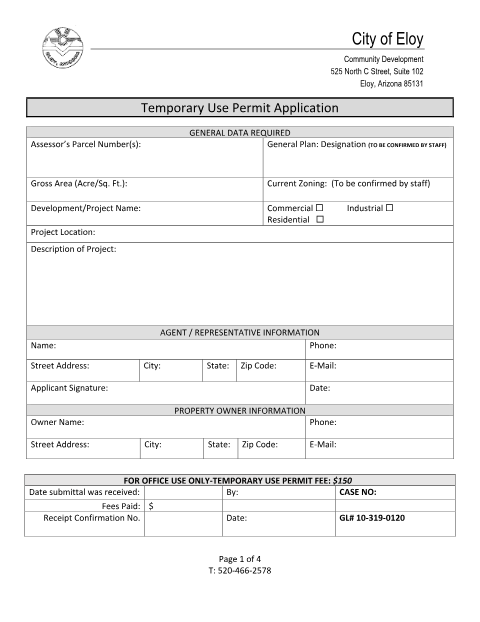
This application requests a City of Eloy permit for a temporary use or structure and is filed by an applicant or agent with information about the project and property.
- licensed online notary
- ~15 min average
- Notarized PDF emailed
What you’ll need
- Government-issued photo ID
- Webcam-enabled device (laptop or phone)
- This form, ready to upload as a PDF
What this form is
The application collects property, project, applicant, and owner information for a proposed temporary use or structure. Submittal requirements include a narrative describing the use and site restoration, plus a scaled site plan showing the proposed use, structures, parking, and other relevant details. The packet also includes an Owner’s Permission section for an owner to authorize an agent to obtain the permit, and lists review criteria and permit validity notes.
Who needs it
Applicants seeking a temporary use permit in Eloy complete the application, and property owners complete the Owner’s Permission section when authorizing an agent.
Why it needs a notary
The Owner’s Permission section contains an acknowledgment block; each property owner granting the agent permission signs before a notary public.
How to get this notarized
- 1
Download the Application
Download the Temporary Use Permit Application from the City of Eloy.
- 2
Fill Out the Form
Enter the property, project, applicant, and owner information, and prepare the narrative and scaled site plan listed in the packet.
- 3
Book an Online Notary
If an owner must complete the Owner’s Permission section, book a session with Rush Notary.
- 4
Sign on Video
The property owner signs the Owner’s Permission acknowledgment during a live audio-video session with a commissioned online notary.
- 5
Submit to the City
Submit the completed application and required materials to City of Eloy Community Development.
Preview the form
The blank PDF straight from Eloy. Look it over, then upload your filled copy to start the notary session.

You’ll need ID and a webcam.
A licensed online notary will join you on video, verify your government-issued ID, witness your signature, and apply their seal. You’ll receive the notarized PDF by email when the session ends.
Frequently asked questions
- How do I submit the Temporary Use Permit Application?
- Complete the application and provide the narrative statement and scaled site plan described in the packet. Submit the materials to the City of Eloy Community Development.
- Do I need notarization for this application?
- The Owner’s Permission section includes a notary acknowledgment. An owner granting an agent permission signs that section before a notary public.
- Can I sign the Owner’s Permission section online?
- Rush Notary sessions are conducted over live audio-video with a commissioned online notary. Arizona has authorized remote online notarization for its own notaries since July 2020 under A.R.S. §41-371 et seq., and recognizes notarial acts by notaries of other states under A.R.S. §33-501. Confirm with the city if unsure.
- What should I include with the application?
- The packet calls for a narrative describing the proposed temporary use and site restoration, and a scaled site plan illustrating proposed uses, structures, parking, and other relevant information.