
Village of Southampton, NY · Suffolk County
Planning Board Affidavit of Posting
This affidavit records that a Planning Board applicant posted the required public-hearing notice sign on the property and files it with the Village of Southampton.
- licensed online notary
- ~15 min average
- Notarized PDF emailed
What you’ll need
- Government-issued photo ID
- Webcam-enabled device (laptop or phone)
- This form, ready to upload as a PDF
What this form is
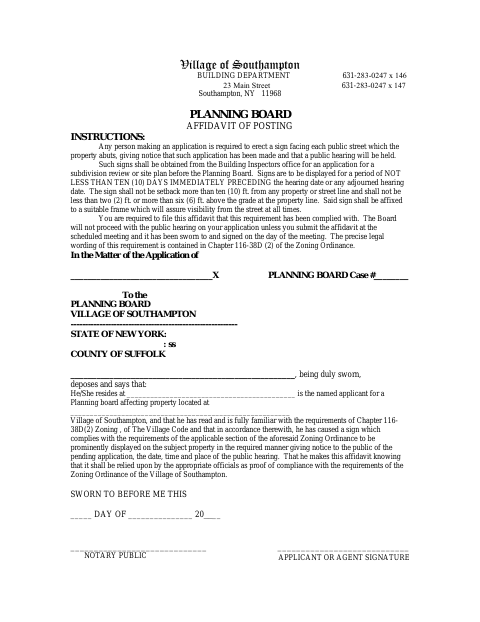
The applicant or agent uses this affidavit to attest that a sign giving notice of the pending Planning Board application and public hearing was displayed on the property as required. The form instructs applicants to display the sign for at least ten days immediately before the hearing or an adjourned hearing. The Village states that the affidavit must be submitted at the scheduled meeting and sworn to and signed on the day of that meeting.
Who needs it
A named applicant or agent for a Village of Southampton Planning Board application must submit the affidavit after posting the required sign on the subject property.
Why it needs a notary
The form includes a sworn-to jurat; the applicant or agent signs and swears to the affidavit before a notary public on the day of the scheduled meeting.
How to get this notarized
- 1
Download The Form
Get the Planning Board Affidavit of Posting from the Village of Southampton.
- 2
Fill In The Details
Complete the applicant, residence, property, and Planning Board case information.
- 3
Book An Online Notary
Schedule a commissioned online notary and check with the Village about accepting an online-notarized affidavit.
- 4
Sign On Video
Sign and swear to the affidavit before the notary on the scheduled meeting day.
- 5
Submit To The Village
Bring or submit the completed affidavit at the scheduled Planning Board meeting.
Preview the form
The blank PDF straight from Village of Southampton. Look it over, then upload your filled copy to start the notary session.

You’ll need ID and a webcam.
A licensed online notary will join you on video, verify your government-issued ID, witness your signature, and apply their seal. You’ll receive the notarized PDF by email when the session ends.
Frequently asked questions
- How do I complete the Planning Board Affidavit of Posting?
- Fill in the applicant, residence, property, and case details, then sign and swear to the affidavit before a notary on the scheduled meeting day. Submit it at the meeting.
- Do I need to post a sign before filing this affidavit?
- Yes. The form says applicants must display a notice sign on the property for at least ten days immediately before the hearing or an adjourned hearing.
- Can I use a commissioned online notary?
- New York permits its own notaries to perform online notarizations. Ask the Village whether it will accept an online-notarized affidavit for your meeting; confirm with the city, town or village if unsure.
- When must I submit the affidavit?
- The form says to submit the affidavit at the scheduled Planning Board meeting. It must be sworn to and signed on the day of that meeting.
Other forms in Village of Southampton
Building Permit Application
Village of Southampton
Disclosure Affidavit
Village of Southampton
Owner Authorization and Endorsement Letter
Village of Southampton
Planning Board Affidavit of Mailing
Village of Southampton
Planning Board Application to Subdivide Real Property
Village of Southampton
Seasonal Rental Registry Application
Village of Southampton
Planning Board Affidavit of Posting in other New York cities
Each city publishes its own version of this form. Pick the city where you’re filing.