
Colfax, ND · Richland County
Trackside Addition Declaration of Covenants and Restrictions
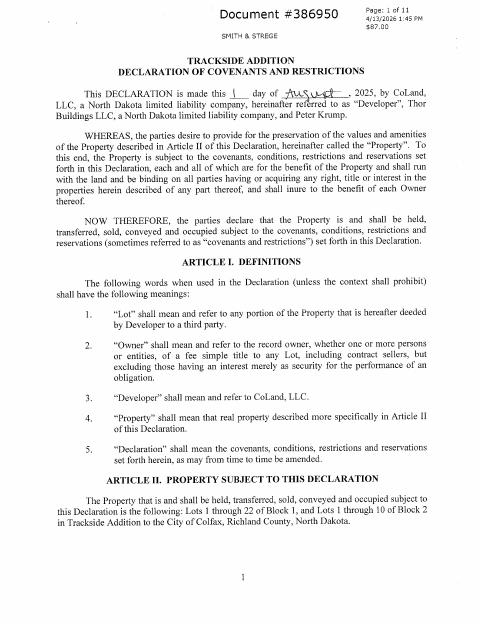
This declaration sets covenants and restrictions for specified lots in Trackside Addition and is signed by the developer and owners for recording.
At a glance
- Issued by
- City of Colfax · Colfax, Richland County, North Dakota
- Notarization
- Required: sign this form in front of a notary before filing it.
- Official source
- colfaxnd.org
- Blank form
- Download the PDF
- Catalogued
- Machine-readable
- JSON record · about the forms index
- licensed online notary
- ~15 min average
- Notarized PDF emailed
What you’ll need
- Government-issued photo ID
- Webcam-enabled device (laptop or phone)
- This form, ready to upload as a PDF
What this form is
The declaration establishes construction, design, maintenance, use, and enforcement rules for Lots 1–22 of Block 1 and Lots 1–10 of Block 2 in Trackside Addition. It says the covenants bind the property and its owners, and provides for a 30-year term with automatic extensions. The document is executed by the owners and developer and includes a notarial acknowledgment for a company representative.
Who needs it
The developer and owners identified as parties to the declaration sign it to establish and record the restrictions governing the described Trackside Addition lots.
Why it needs a notary
The form carries an acknowledgment block for the company representative, who personally appears before the notary and acknowledges signing on the company’s behalf.
How to get this notarized
- 1
Download The Declaration
Get the Trackside Addition Declaration of Covenants and Restrictions PDF.
- 2
Review And Complete The Form
Review the covenants, property description, and signature details with the other required parties.
- 3
Book An Online Notary
Schedule a remote appointment with a commissioned online notary for the company representative’s acknowledgment.
- 4
Sign On Video
The company representative appears before the notary and acknowledges signing on the company’s behalf.
- 5
Submit For Recording
Submit the completed, notarized declaration for recording with the appropriate county office.
Preview the form
The blank PDF straight from Colfax. Look it over, then upload your filled copy to start the notary session.

You’ll need ID and a webcam.
A licensed online notary will join you on video, verify your government-issued ID, witness your signature, and apply their seal. You’ll receive the notarized PDF by email when the session ends.
Frequently asked questions
- How do I complete the Trackside Addition declaration?
- Review the covenants and property description, complete the relevant details, and arrange for the company representative and other required signers to sign. Submit the executed document for recording.
- Do I need to sign this declaration in front of a notary?
- Yes. The document includes a notarial acknowledgment for the company representative, who must personally appear before the notary and acknowledge signing for the company.
- Can I use a commissioned online notary for this document?
- North Dakota authorizes remote notarization by its notaries under N.D.C.C. §44-06.1-13.1, and N.D.C.C. §44-06.1-10 recognizes qualifying notarial acts performed by an authorized officer of another state. Confirm with the city if unsure.
- Who signs the declaration?
- The document states that the undersigned are all of the owners and the developer. Its acknowledgment page names a CoLand, LLC member signing on behalf of the company.