
Pharr, TX · Hidalgo County
Contractor Authorization Form
A registered contractor's sworn authorization letting a named agent or employee pull building permits under the company's license with the City of Pharr.
- licensed online notary
- ~15 min average
- Notarized PDF emailed
What you’ll need
- Government-issued photo ID
- Webcam-enabled device (laptop or phone)
- This form, ready to upload as a PDF
What this form is
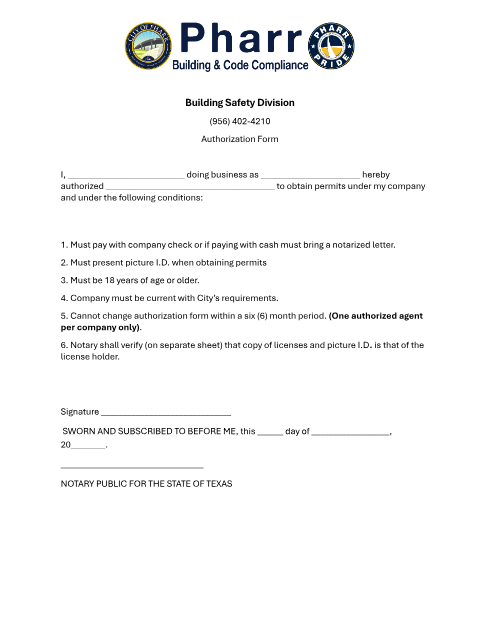
Registered contractors in Pharr who want someone other than themselves to obtain permits on the company's behalf must complete this Building Safety Division authorization form. The company owner names the authorized agent, confirms the agent is 18 or older, and swears to the authorization before a notary, whose separate verification of the agent's license and photo ID is also required.
Who needs it
A registered contractor or company owner authorizing a specific employee or agent to pull building permits under the company's name in Pharr.
Why it needs a notary
The form requires the owner's signature to be sworn and subscribed before a notary public, who signs as 'Notary Public for the State of Texas.'
How to get this notarized
- 1
Download the Authorization Form
Get the official Contractor Authorization Form from the City of Pharr Building Safety Division.
- 2
Fill in Owner and Agent Details
Enter the company name, owner information, and the name of the authorized agent.
- 3
Book an Online Notary Session
Schedule a live video appointment with a commissioned online notary.
- 4
Swear and Sign on Video
Verify your ID and sign the authorization under oath in front of the online notary.
- 5
Submit to the City of Pharr
File the notarized authorization with the Building Safety Division so your agent can begin pulling permits.
Preview the form
The blank PDF straight from Pharr. Look it over, then upload your filled copy to start the notary session.

You’ll need ID and a webcam.
A licensed online notary will join you on video, verify your government-issued ID, witness your signature, and apply their seal. You’ll receive the notarized PDF by email when the session ends.
Frequently asked questions
- Do I need this contractor authorization form notarized in Pharr?
- Yes. The City of Pharr Building Safety Division requires the company owner's signature to be sworn and subscribed before a notary public before an agent can pull permits under the company's license.
- How do I get my Pharr contractor authorization notarized online?
- Upload the completed form, verify your identity, and connect over live video with a commissioned online notary to swear and sign in one session.
- Who needs to sign the authorization?
- The contractor or company owner signs, authorizing a named agent who must be at least 18 years old to obtain permits on the company's behalf.
- How long is the authorization valid?
- Per the form, the authorization cannot be changed within a six-month period, and only one authorized agent per company is allowed at a time.
- Can I use an online notary for a Pharr city form?
- Yes. Texas has authorized remote online notarization since 2018 and recognizes acknowledgments from a commissioned online notary; check with the City of Pharr Building Safety Division if you're unsure about a specific submission.