
Plandome Manor, NY · Nassau County
Rental Registration Application
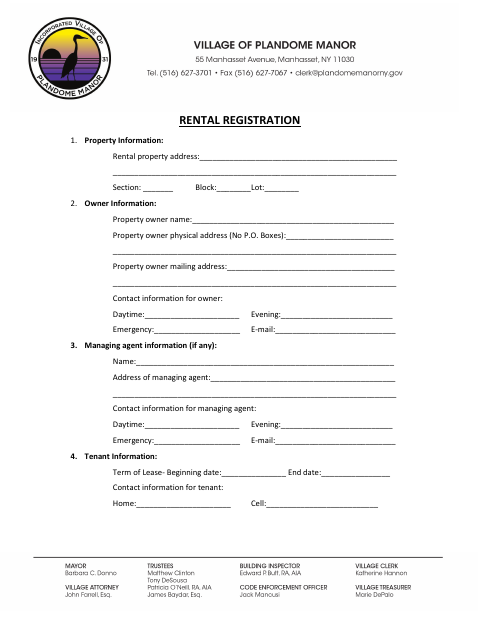
This application records rental property, owner, managing agent and tenant details for property owners submitting a rental permit application to the Village of Plandome Manor.
- licensed online notary
- ~15 min average
- Notarized PDF emailed
What you’ll need
- Government-issued photo ID
- Webcam-enabled device (laptop or phone)
- This form, ready to upload as a PDF
What this form is
Use this application to provide the Village of Plandome Manor with details about a rental property, its owner, any managing agent, and the tenant and lease term. The owner must sign the declaration, which addresses the accuracy of the application, code compliance and property maintenance, and submit it as part of the rental permit application. The form also asks the owner to affirm that smoke and carbon monoxide detectors are properly located and working.
Who needs it
The property owner completes this application with rental property, owner, tenant and lease information when applying for a rental permit.
Why it needs a notary
The owner signs the sworn declaration before a notary, who completes the form’s “Sworn to before this” and Notary Public block.
How to get this notarized
- 1
Download The Application
Get the Rental Registration Application from the Village of Plandome Manor.
- 2
Fill In The Form
Enter the property, owner, managing agent and tenant details, along with the lease beginning and end dates.
- 3
Book An Online Notary
Schedule a commissioned online notary to notarize the owner’s declaration.
- 4
Sign On Video
Sign the declaration during the online notarization and have the notary complete the sworn-to block.
- 5
Submit To The Village
Submit the completed application as part of the rental permit application.
Preview the form
The blank PDF straight from Plandome Manor. Look it over, then upload your filled copy to start the notary session.

You’ll need ID and a webcam.
A licensed online notary will join you on video, verify your government-issued ID, witness your signature, and apply their seal. You’ll receive the notarized PDF by email when the session ends.
Frequently asked questions
- How do I complete the notarized declaration?
- Fill in the application, then sign the owner declaration before a notary. The notary completes the “Sworn to before this” section and Notary Public block.
- Do I need to notarize this application?
- Yes. The form says the property owner’s signature must be notarized and provides a sworn declaration and Notary Public block.
- Can I sign this form with an online notary?
- New York has authorized its notaries to perform remote online notarizations since 2023. Book a commissioned online notary to complete the sworn declaration by video.
- What information should I gather before filling it out?
- The application asks for the property address and section, block and lot; owner and managing agent contacts; and tenant contact information and lease dates. Confirm with the city, town or village if unsure.
Rental Registration Application in other Nassau County cities
Each city publishes its own version of this form. Pick the city where you’re filing.